plot15 · 代码 5 · 图 1 · 笔记 10 · 代码库专题
umap
代码库整理的专题,README 见原始目录。
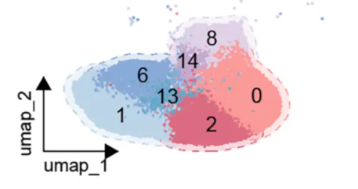
image4.2_单细胞UMAP美化huage/image.png
图源:image.png
分析代码
5 个源码文件,按目录顺序;本机绝对路径已替换为 ~。 代码可复制,但需要按自己的数据改路径与参数。
4.1_张泽民umap美化/02_画图代码_云雾感umap.r
# ================================================================================
# 张泽民团队"云雾感" UMAP 画图函数(可复用)
# 来源: GSE243013 (PD-1治疗NSCLC免疫图谱, Cell) / 新叶910生信技能树教程
# 核心秘诀: geom_point(size=0.03, shape=16, stroke=0) + 极简画布
#
# 用法: 准备数据框(df)含 3 列: UMAP_1, UMAP_2, Cluster (细胞分组)
#       plot_misty_umap(df, color)  → 每亚群一张"云雾感"小图
# ================================================================================

rm(list = ls())
library(ggplot2)
library(ggh4x)     # facet 增强(可选)
library(dplyr)

# --------------------------------------------------------------------------------
# 1. 数据读取示例 (GSE243013)
#    实际使用时: 用自己的 UMAP 坐标 + 细胞分组替换
# --------------------------------------------------------------------------------
if (FALSE) {
  # 方式A: 从 GEO 下载的 UMAP 坐标 + metadata 合并
  up_pos <- rio::import('GSE243013/B_UMAP.csv', data.table = F)
  meta   <- rio::import('GSE243013/GSE243013_NSCLC_immune_scRNA_metadata.csv.gz')
  df <- merge(up_pos, meta, by = 'cellID')
  df <- df[, c(2, 3, 11)]
  colnames(df) <- c('UMAP_1', 'UMAP_2', 'Cluster')
  df$label <- "B cells"   # 分面条带名称
}

# --------------------------------------------------------------------------------
# 2. 配色方案 (张泽民团队风格, 10色莫兰迪)
# --------------------------------------------------------------------------------
color <- c("#919ac2", "#ffac98", "#70a4c8", "#a5a9af", "#63917d",
           "#dbd1b4", "#6e729a", "#9ba4bd", "#c5ae5f", "#b9b8d6")

# --------------------------------------------------------------------------------
# 3. 云雾感 UMAP 画图函数
# --------------------------------------------------------------------------------
plot_misty_umap <- function(df, color = NULL, label = NULL,
                            size = 0.03, save_path = NULL,
                            width = 2, height = 2, dpi = 300) {
  # df: 数据框, 需含 UMAP_1, UMAP_2, Cluster 三列
  # color: 颜色向量 (长度>=Cluster种类数), 缺省用内置10色
  # label: 分面条带文本 (可选, 例如 "B cells")
  # size: 点大小, 云雾感核心参数
  # save_path: 输出png路径; 为NULL则不保存只返回对象

  if (is.null(color)) color <- c("#919ac2", "#ffac98", "#70a4c8", "#a5a9af",
                                 "#63917d", "#dbd1b4", "#6e729a", "#9ba4bd",
                                 "#c5ae5f", "#b9b8d6")
  df$Cluster <- as.factor(df$Cluster)
  if (!is.null(label)) df$label <- label

  p <- ggplot(df, aes(x = UMAP_1, y = UMAP_2, color = Cluster)) +
    geom_point(size = size, shape = 16, stroke = 0) +
    scale_color_manual(values = color) +
    theme_classic() +
    theme(plot.background = element_blank(),
          panel.grid.major = element_blank(),
          panel.grid.minor = element_blank(),
          axis.title.x = element_blank(),
          axis.title.y = element_blank(),
          axis.text = element_blank(),
          axis.ticks = element_blank(),
          axis.line = element_line(colour = "black", size = 0.3,
                                   arrow = arrow(length = unit(0.1, "cm"))),
          legend.position = "none",
          aspect.ratio = 1) +
    scale_x_continuous(limits = c(min(df$UMAP_1), max(df$UMAP_1))) +
    scale_y_continuous(limits = c(min(df$UMAP_2), max(df$UMAP_2)))

  if (!is.null(label)) {
    p <- p + facet_grid(~label) +
      theme(strip.background = element_rect(fill = '#e6bac5', color = NA),
            strip.placement = 'outside',
            strip.text = element_text(size = 8))
  }

  if (!is.null(save_path)) {
    ggsave(filename = save_path, height = height, width = width,
           plot = p, dpi = dpi, bg = "white")
    cat("已保存:", save_path, "\n")
  }
  p
}

# --------------------------------------------------------------------------------
# 4. 使用示例: 单个亚群或全部分面
# --------------------------------------------------------------------------------
## 例1: 单一细胞群 (B cells)
# p <- plot_misty_umap(df = df, color = color, label = "B cells",
#                      save_path = "BCells_Umap.png")

## 例2: 不分面, 全细胞群一张图
# p <- plot_misty_umap(df = df, color = color)

## 例3: 遍历每个细胞群单独出图(供PS拼装)
# lapply(unique(df$label), function(lb) {
#   df_sub <- df[df$label == lb, ]
#   plot_misty_umap(df = df_sub, color = color, label = lb,
#                   save_path = paste0(gsub(" ", "_", lb), "_Umap.png"))
# })
4.1_张泽民umap美化/03_图例与拼接.r
# ================================================================================
# 图例单独绘制 + 多亚群图片拼接说明
# 张泽民团队风格: 主图不放图例, 图例单独画一张, 最后用PS拼装
# ================================================================================

rm(list = ls())
library(ggplot2)

# --------------------------------------------------------------------------------
# 1. 配色方案 (与主图一致)
# --------------------------------------------------------------------------------
color <- c("#919ac2", "#ffac98", "#70a4c8", "#a5a9af", "#63917d",
           "#dbd1b4", "#6e729a", "#9ba4bd", "#c5ae5f", "#b9b8d6")
cluster_names <- c("B cells", "CD4+ T", "CD8+ T", "DC", "Epithelial",
                   "Macrophage", "Monocyte", "NK", "Neutrophil", "pDC")

# --------------------------------------------------------------------------------
# 2. 图例绘制函数
# --------------------------------------------------------------------------------
plot_legend <- function(cluster_colors = color,
                        cluster_labels = cluster_names,
                        ncol = 2, size = 2) {
  # 构造假数据画图例
  df_legend <- data.frame(
    x = rep(1, length(cluster_labels)),
    y = 1:length(cluster_labels),
    Cluster = factor(cluster_labels, levels = cluster_labels)
  )

  p <- ggplot(df_legend, aes(x = x, y = y, color = Cluster)) +
    geom_point(size = 0, shape = 16, stroke = 0) +  # 隐藏点
    theme_void() +
    scale_color_manual(values = cluster_colors, name = '') +
    theme(aspect.ratio = 1,
          legend.position = 'bottom',
          plot.margin = margin(0, 0, 0, 0)) +
    guides(color = guide_legend(ncol = ncol,
                                override.aes = list(size = size, alpha = 1))) +
    theme(legend.text = element_text(size = 5),
          legend.spacing.y = unit(0, 'cm'),
          legend.key.height = unit(0, "cm"),
          legend.box.spacing = unit(0, 'cm'))
  p
}

## 绘制并保存图例
# p_legend <- plot_legend()
# ggsave("FigureS1C_legend.pdf", plot = p_legend, width = 3.5, height = 6, dpi = 500)

# --------------------------------------------------------------------------------
# 3. 图片拼接说明
# --------------------------------------------------------------------------------
# 张泽民团队的做法:
#   1) 每个细胞群/亚群单独画一张"云雾感"小图 (height=2, width=2, dpi=300)
#   2) 图例单独画一张 (height=6, width=3.5, dpi=500)
#   3) 用 PS (Photoshop) 或 AI (Illustrator) 手工拼装成组合图

# 自动出图(供拼接)的批量代码:
if (FALSE) {
  # 假设 df 有 label 列(细胞群名)
  # 每个亚群一张单独png
  source("02_画图代码_云雾感UMAP.R")

  # 遍历每个细胞群
  for (lb in unique(df$label)) {
    df_sub <- df[df$label == lb, ]
    plot_misty_umap(
      df = df_sub, color = color, label = lb,
      save_path = paste0("misty_umap_", gsub("[ /]", "_", lb), ".png")
    )
  }

  # 画图例
  p_legend <- plot_legend()
  ggsave("misty_umap_legend.pdf", plot = p_legend, width = 3.5, height = 6, dpi = 500)
}
# 然后: 把所有 png + legend.pdf 导入 PS, 按期刊布局排列即可
4.2_单细胞umap美化huage/01_单细胞umap美化全流程.r
# ==============================================================================
# 单细胞 UMAP 美化全流程 — 群体轮廓 + 短坐标轴(审稿人友好版)
# 对应教程:公众号「华哥生信」让审稿人一眼喜欢的 UMAP 图:单细胞美化全流程
# 原文链接:https://mp.weixin.qq.com/s/bgEjYq9z9gih4viiK0COLQ
# ------------------------------------------------------------------------------
# 特点:与常规 Seurat 默认 UMAP 不同,本图在细胞群外添加半透明群体轮廓/
#       包络区域(stat_unchull),让读者一眼看出不同细胞群的分布范围、
#       重叠关系和空间边界;并用左下角短箭头坐标轴替代完整坐标轴。
# 依赖包:Seurat, ggplot2, grid, ggunchull(绘制群轮廓)
# 输入:已完成的 Seurat 对象(含 UMAP 降维 + 细胞注释)
# 输出:美化版 UMAP 图(plot4)
# 知识库笔记:03 生信教程与工具库/02_wiki/tools/可视化与配色/(待整理)
# ==============================================================================

## ----- 0. 加载包 -----
# install.packages("ggunchull")   # 未安装先装
library(Seurat)
library(ggplot2)
library(grid)
library(ggunchull)

## ----- 1. 读取 Seurat 对象 -----
# 已含质控、降维(UMAP)和注释的单细胞对象
# setwd("E:/xy/2026/five/5.12/")
load("scRNA.rdata")

## ----- 2. 提取 UMAP 坐标与细胞类型 -----
scRNA.sub <- scRNA   # 若需要子集,在此设置
plotData <- as.data.frame(scRNA.sub[["umap"]]@cell.embeddings)
colnames(plotData)[1:2] <- c("umap_1", "umap_2")

# 将 celltype 注释赋值并设置图例显示顺序
scRNA.sub$celltype <- scRNA.sub$celltype.3
plotData$cluster <- factor(
  scRNA.sub$celltype,
  levels = c("Tcells", "Myeloid", "Cancer", "Endothelial_cell",
             "Fibroblasts", "Neutrophils", "Bcells")   # 按需改为自己的类型
)

## ----- 3. 自定义细胞类型配色(柔和统一)-----
mycols <- c(
  "Tcells"            = "#D95F5F",
  "Myeloid"           = "#C9A227",
  "Cancer"            = "#5DAE5D",
  "Endothelial_cell"  = "#4DB6AC",
  "Fibroblasts"       = "#4C78A8",
  "Neutrophils"       = "#8E77B8",
  "Bcells"            = "#D77FB3"
)

## ----- 4. 计算左下角短坐标轴位置 -----
# 根据 UMAP 坐标范围自动计算,使坐标轴不遮挡主体
x_range <- range(plotData$umap_1, na.rm = TRUE)
y_range <- range(plotData$umap_2, na.rm = TRUE)
x_min <- x_range[1] - 2; x_max <- x_range[2]
y_min <- y_range[1] - 2; y_max <- y_range[2]
x_span <- x_max - x_min; y_span <- y_max - y_min

x_axis_len   <- x_span * 0.18
y_axis_len   <- y_span * 0.18
x_axis_start <- x_min - x_span * 0.03
y_axis_start <- y_min - y_span * 0.03

x_lim <- c(x_min - x_span * 0.08, x_max + x_span * 0.05)
y_lim <- c(y_min - y_span * 0.08, y_max + y_span * 0.05)

## ----- 5. 绘制带细胞群轮廓的 UMAP -----
# stat_unchull:给每个细胞群添加半透明虚线边界
plot <- ggplot(plotData, aes(x = umap_1, y = umap_2, color = cluster, fill = cluster)) +
  stat_unchull(alpha = 0.22, size = 0.35, delta = 0.45, linetype = "dashed") +
  geom_point(size = 0.8, alpha = 0.85, stroke = 0) +
  scale_color_manual(values = mycols, name = NULL) +
  scale_fill_manual(values = mycols, name = NULL) +
  coord_fixed(xlim = x_lim, ylim = y_lim, clip = "off") +
  labs(x = NULL, y = NULL) +
  theme_classic(base_size = 12)
plot

## ----- 6. 调整主题(CNS 风格:去背景/坐标轴/网格)-----
plot2 <- plot + theme(
  aspect.ratio = 1,
  panel.background = element_blank(),
  panel.grid = element_blank(),
  axis.line = element_blank(),
  axis.ticks = element_blank(),
  axis.text = element_blank(),
  axis.title = element_blank(),
  legend.position = "right",
  legend.title = element_blank(),
  legend.text = element_text(size = 8),
  legend.key.size = unit(0.35, "cm"),
  legend.background = element_blank(),
  legend.key = element_blank(),
  plot.margin = margin(20, 20, 20, 20)
)
plot2

## ----- 7. 添加左下角短箭头坐标轴 -----
plot3 <- plot2 +
  annotate("segment",
    x = x_axis_start, xend = x_axis_start + x_axis_len,
    y = y_axis_start, yend = y_axis_start,
    linewidth = 0.45, color = "black",
    arrow = arrow(length = unit(0.12, "cm"), type = "closed")) +
  annotate("segment",
    x = x_axis_start, xend = x_axis_start,
    y = y_axis_start, yend = y_axis_start + y_axis_len,
    linewidth = 0.45, color = "black",
    arrow = arrow(length = unit(0.12, "cm"), type = "closed")) +
  annotate("text",
    x = x_axis_start + x_axis_len * 0.55,
    y = y_axis_start - y_span * 0.035,
    label = "umap_1", size = 3.5, fontface = "italic") +
  annotate("text",
    x = x_axis_start - x_span * 0.035,
    y = y_axis_start + y_axis_len * 0.55,
    label = "umap_2", size = 3.5, fontface = "italic", angle = 90)
plot3

## ----- 8. 优化图例并输出 -----
# guide_legend 调整图例点大小/透明度,避免主图点小导致图例不可辨识
plot4 <- plot3 +
  guides(
    color = guide_legend(override.aes = list(size = 2.5, alpha = 1)),
    fill  = guide_legend(override.aes = list(alpha = 0.25))
  )
plot4

# ggsave("UMAP_美化全流程.png", plot4, width = 8, height = 7, dpi = 300, bg = "white")
# ggsave("UMAP_美化全流程.pdf", plot4, width = 8, height = 7, bg = "white")

# ==============================================================================
# 关键提醒
# 1. stat_unchull 需要 ggunchull 包;delta 参数控制轮廓平滑度(越小越贴合点)。
# 2. levels 中细胞类型需与自己的 Seurat 注释一致,否则 factor 出现 NA。
# 3. mycols 需覆盖所有细胞类型,缺失会导致报错。
# 4. 短坐标轴位置基于坐标范围自动计算,数据不同会自动适配。
# ==============================================================================
4.3_单元格图_schex/02_画图代码_schex.r
# ============================================================
# schex 单元格图(hexbin)补充 featureplot —— 展示关键基因表达
# 复现《Human oral mucosa cell atlas》Cell 2021 风格
# 教程来源: 生信作曲家《不妨试试单元格图补充featureplot来展示关键基因的表达》
# https://mp.weixin.qq.com/s/-NcLFooum0gwqJZ8Y8ZCcw
#
# ⚠️ 适配说明(2026-08 实测):
#   schex >= 1.20 移除了 plot_hexbin_gene,且不再直接支持 Seurat 对象。
#   本脚本统一采用官方推荐流程: Seurat -> as.SingleCellExperiment() -> schex
#   基因表达用 plot_hexbin_feature(type="logcounts", feature=gene) 替代。
# ============================================================

required_packages <- c(
  "Seurat", "schex", "ggplot2", "cowplot",
  "SingleCellExperiment", "SummarizedExperiment"
)
missing_packages <- required_packages[!vapply(
  required_packages,
  requireNamespace,
  logical(1),
  quietly = TRUE
)]
if (length(missing_packages) > 0) {
  stop(
    "请先安装依赖包: ",
    paste(missing_packages, collapse = ", "),
    "\n  schex 为 Bioconductor 包: BiocManager::install('schex')\n",
    call. = FALSE
  )
}

library(Seurat)
library(schex)
library(ggplot2)
library(cowplot)
library(SingleCellExperiment)

# ============================================================
# 核心函数 1: 建立六边形分箱(Seurat 或 SCE 均可,返回 SCE 对象)
# ============================================================
make_hex <- function(object, nbins = 20, dimension_reduction = "UMAP") {
  if (inherits(object, "Seurat")) {
    # Seurat 的 reduction 名是小写 (umap/pca/tsne),需大小写不敏感匹配
    if (!tolower(dimension_reduction) %in% tolower(Reductions(object))) {
      stop(
        "对象中不存在降维 '", dimension_reduction,
        "',请先运行 RunPCA/RunUMAP。",
        call. = FALSE
      )
    }
    object <- as.SingleCellExperiment(object)
  }
  # SCE 的 reducedDim 名是大写 (UMAP/PCA/TSNE),规范化后使用
  rdn <- reducedDimNames(object)
  idx <- which(tolower(rdn) == tolower(dimension_reduction))
  if (length(idx) == 0) {
    stop(
      "对象中不存在降维 '", dimension_reduction,
      "',请先运行 RunPCA/RunUMAP。",
      call. = FALSE
    )
  }
  make_hexbin(
    object,
    nbins = nbins,
    dimension_reduction = rdn[idx][1]
  )
}

# ============================================================
# 核心函数 2: 按基因表达绘制 hexbin 单元格图
# 注: 新版 schex 用 plot_hexbin_feature 取代已移除的 plot_hexbin_gene
# ============================================================
plot_hex_gene <- function(object, gene,
                          action = "mean", type = "logcounts",
                          palette_option = "A",
                          title = NULL) {
  p <- plot_hexbin_feature(
    object,
    type = type,
    feature = gene,
    action = action
  ) +
    scale_fill_viridis_c(option = palette_option) +
    theme_cowplot() +
    labs(title = title, fill = paste0(gene, " (", action, ")"))
  p
}

# ============================================================
# 核心函数 3: 按细胞群绘制 hexbin 单元格图(展示细胞分布)
# ============================================================
plot_hex_cluster <- function(object, col = "cluster",
                             action = "majority") {
  plot_hexbin_meta(
    object,
    col = col,
    action = action
  ) +
    theme_cowplot()
}

# ============================================================
# 示例:完整流程(数据替换为你的 Seurat 对象即可)
# ============================================================
if (FALSE) {
  # ---- 1. 预处理(可选:细胞周期回归,来自原文)----
  # s.genes <- cc.genes$s.genes
  # g2m.genes <- cc.genes$g2m.genes
  # scRNA <- CellCycleScoring(scRNA,
  #   s.features = s.genes, g2m.features = g2m.genes,
  #   set.ident = TRUE
  # )
  # scRNA <- ScaleData(scRNA, vars.to.regress = c("S.Score", "G2M.Score"))

  # ---- 2. 标准 Seurat 流程(须先有 UMAP)----
  # scRNA <- NormalizeData(scRNA)
  # scRNA <- FindVariableFeatures(scRNA, selection.method = "vst", nfeatures = 2000)
  # scRNA <- ScaleData(scRNA)
  # scRNA <- RunPCA(scRNA, npcs = 50)
  # scRNA <- FindNeighbors(scRNA, reduction = "pca", dims = 1:50)
  # scRNA <- FindClusters(scRNA, resolution = 0.8)
  # scRNA <- RunUMAP(scRNA, reduction = "pca", dims = 1:50)

  # ---- 3. 建立分箱 + 展示目标基因表达 ----
  # hex <- make_hex(scRNA, nbins = 20, dimension_reduction = "UMAP")
  # p1 <- plot_hex_gene(hex, gene = "IGHG1", action = "mean")
  # ggsave("hexbin_IGHG1.png", p1, width = 7, height = 6, dpi = 300)

  # ---- 4. (可选)展示细胞群分布 ----
  # p2 <- plot_hex_cluster(hex, col = "seurat_clusters")
  # ggsave("hexbin_clusters.png", p2, width = 7, height = 6, dpi = 300)
}

message("schex 单元格图函数已就绪: make_hex() / plot_hex_gene() / plot_hex_cluster()")
4.2_单细胞umap美化huage/umap_cns风格轮廓编号图/umap_unchull_numbered_template.r
# ============================================================
# umap_unchull_numbered_template.R
# 通用 UMAP 美化: 细胞群轮廓 + 群中心编号 + 编号图例 + 短箭头坐标轴
# 输入: CSV, 至少含 UMAP_1 / UMAP_2 / celltype 三列
# 输出: 仅 PDF 矢量图
# 依赖: ggplot2 (建议 3.5.2), ggunchull
# ============================================================

suppressPackageStartupMessages({
  library(ggplot2)
  library(ggunchull)
})

# ---- 1. 用户设置 ----
input_csv <- "umap_plot_data.csv"
output_pdf <- "umap_celltype_numbered.pdf"
x_col <- "UMAP_1"
y_col <- "UMAP_2"
celltype_col <- "celltype"

# 图例从上到下的细胞类型顺序; 同时决定主图连续编号 1...N。
legend_levels <- c(
  "CD8+ T cells", "CD4+ T cells", "Macrophages", "DCs", "Monocytes",
  "Keratinocytes", "Lymphatic ECs", "Melanocytes", "ECs", "FBs", "Pericytes"
)

# 与 legend_levels 一一对应。示例: 深红 → 浅红 → 浅蓝 → 深蓝。
celltype_colors <- c(
  "#A61214", "#DE4230", "#F68B69", "#E8A48C", "#F9CAB5",
  "#A4CFE2", "#88BBD8", "#7F9DB5", "#4E9EC7", "#3792C1", "#2B6C96"
)
pdf_width_cm <- 12.5
pdf_height_cm <- 9

# ---- 2. 读取并校验数据 ----
df <- read.csv(input_csv, stringsAsFactors = FALSE, check.names = FALSE)
required_cols <- c(x_col, y_col, celltype_col)
if (!all(required_cols %in% names(df))) {
  stop("输入 CSV 缺少列: ", paste(setdiff(required_cols, names(df)), collapse = ", "))
}
if (!setequal(sort(unique(df[[celltype_col]])), sort(legend_levels))) {
  stop("legend_levels 与数据中的细胞类型不一致。\n数据: ",
       paste(sort(unique(df[[celltype_col]])), collapse = " | "), "\n图例: ",
       paste(legend_levels, collapse = " | "))
}
if (length(celltype_colors) != length(legend_levels)) {
  stop("celltype_colors 必须与 legend_levels 等长。")
}

plot_data <- data.frame(
  umap_1 = df[[x_col]], umap_2 = df[[y_col]],
  celltype = factor(df[[celltype_col]], levels = legend_levels)
)
celltype_num <- setNames(seq_along(legend_levels), legend_levels)
plot_data$celltype_num <- unname(celltype_num[as.character(plot_data$celltype)])
celltype_colors <- setNames(celltype_colors, legend_levels)
legend_labels <- setNames(sprintf("%d: %s", seq_along(legend_levels), legend_levels), legend_levels)

# ---- 3. 群中心与短坐标轴位置 ----
centers <- aggregate(cbind(umap_1, umap_2) ~ celltype + celltype_num,
                     data = plot_data, FUN = median)
x_range <- range(plot_data$umap_1, na.rm = TRUE)
y_range <- range(plot_data$umap_2, na.rm = TRUE)
x_span <- diff(x_range); y_span <- diff(y_range)
x_lim <- x_range + c(-0.045, 0.02) * x_span
y_lim <- y_range + c(-0.045, 0.02) * y_span
x_axis_start <- x_lim[1] + x_span * 0.035
y_axis_start <- y_lim[1] + y_span * 0.035
x_axis_len <- x_span * 0.16
y_axis_len <- y_span * 0.16

# ---- 4. 绘图 ----
p <- ggplot(plot_data, aes(umap_1, umap_2, color = celltype, fill = celltype)) +
  stat_unchull(alpha = 0.18, linewidth = 0.32, delta = 0.45, linetype = "dashed") +
  geom_point(size = 0.34, alpha = 0.78, stroke = 0) +
  geom_label(
    data = centers, aes(umap_1, umap_2, label = celltype_num), inherit.aes = FALSE,
    size = 3.1, fontface = "bold", color = "black", fill = "white",
    label.size = 0.25, label.padding = unit(0.12, "lines")
  ) +
  scale_color_manual(values = celltype_colors, breaks = legend_levels,
                     labels = legend_labels[legend_levels], name = NULL) +
  scale_fill_manual(values = celltype_colors, guide = "none") +
  coord_cartesian(xlim = x_lim, ylim = y_lim, clip = "off") +
  theme_classic(base_size = 11) +
  theme(
    panel.background = element_rect(fill = "white", color = NA),
    plot.background = element_rect(fill = "white", color = NA),
    panel.grid = element_blank(), axis.line = element_blank(),
    axis.ticks = element_blank(), axis.text = element_blank(), axis.title = element_blank(),
    aspect.ratio = 1, legend.position = "right",
    legend.text = element_text(size = 8.2, color = "black"), legend.key = element_blank(),
    legend.key.height = unit(0.32, "cm"), legend.key.width = unit(0.28, "cm"),
    legend.spacing.y = unit(0, "cm"), plot.margin = margin(2, 4, 2, 2)
  ) +
  guides(color = guide_legend(override.aes = list(size = 2.8, alpha = 1))) +
  annotate("segment", x = x_axis_start, xend = x_axis_start + x_axis_len,
           y = y_axis_start, yend = y_axis_start, linewidth = 0.42, color = "black",
           arrow = arrow(length = unit(0.12, "cm"), type = "closed")) +
  annotate("segment", x = x_axis_start, xend = x_axis_start,
           y = y_axis_start, yend = y_axis_start + y_axis_len, linewidth = 0.42, color = "black",
           arrow = arrow(length = unit(0.12, "cm"), type = "closed")) +
  annotate("text", x = x_axis_start + x_axis_len * 0.55, y = y_axis_start - y_span * 0.045,
           label = "UMAP_1", size = 3.0, fontface = "italic") +
  annotate("text", x = x_axis_start - x_span * 0.045, y = y_axis_start + y_axis_len * 0.55,
           label = "UMAP_2", size = 3.0, fontface = "italic", angle = 90)

# ---- 5. 输出 PDF ----
ggsave(output_pdf, p, width = pdf_width_cm, height = pdf_height_cm,
       units = "cm", device = cairo_pdf, bg = "white")
cat("PDF 输出: ", output_pdf, "\n")
cat("编号图例: ", paste(legend_labels, collapse = " | "), "\n")
用 MCP 直接出图
这个专题已经做成确定性工具,调用后直接返回图片, 不需要 AI 现写代码。