plot26 · 代码 95 · 图 123 · 笔记 14 · 代码库专题
MsTt模板
代码库整理的专题,README 见原始目录。
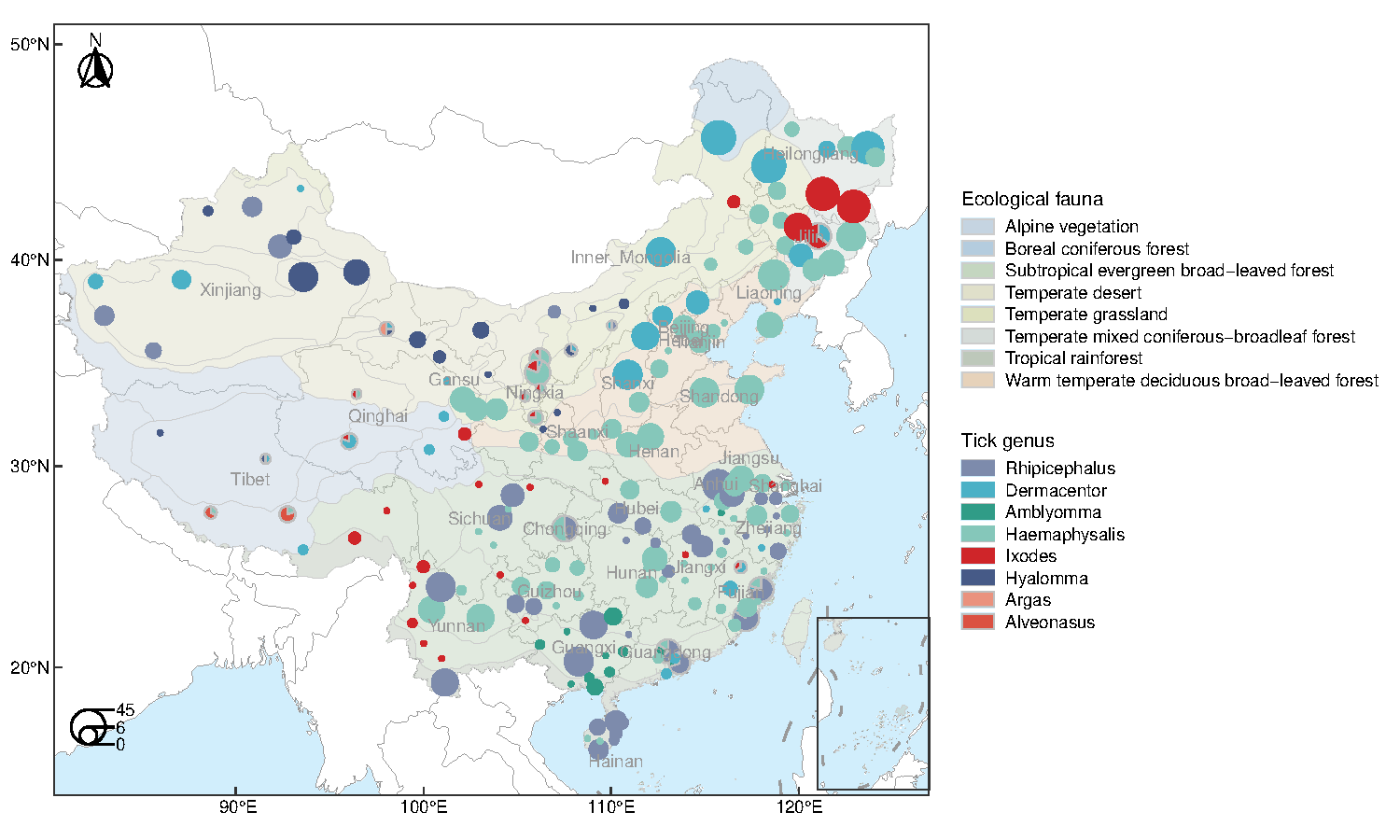
map1251201_china_map/map1.pdf
共 8 张:点缩略图切换主图,下载按钮跟随当前主图。
图源:map1.pdf
分析代码
8 个源码文件,按目录顺序;本机绝对路径已替换为 ~。 代码可复制,但需要按自己的数据改路径与参数。
240606_correlation_heatmap_hcluster/correlation_heatmap_hcluster.r
library(tidyverse)
library(reshape2)
library(factoextra)
library(grid)
library(cowplot)

## read data
df <- read.csv("data/data.csv", row.names = 1, check.names = FALSE)
group <- read.csv("data/group.csv", check.names = FALSE)


## set color
mycol <- c("#A69900", "#8F1D00", "#056258", "#6A478F")


## calculate correlation and hclust
df_log <- log10(df + 0.000001)

corr <- cor(df_log, method = "pearson")
dist_matrix <- as.dist(1 - corr)
hclust_tree  <- hclust(dist_matrix, method = "complete")

## 得到上三角矩阵
get_lower_tri<-function(corr){
  corr[upper.tri(corr)] <- NA
  return(corr)
}
## 得到下三角矩阵
get_upper_tri <- function(corr){
  corr[lower.tri(corr)]<- NA
  return(corr)
}

## 重排序相关矩阵
corr <- corr[hclust_tree$order, hclust_tree$order]
upper_tri <- get_upper_tri(corr)


# hcluter tree
t <- fviz_dend(hclust_tree,
               show_labels = FALSE,
               lwd = 0.4, axes = FALSE,
               ylab = "", main = "Cluster Dendrogram",
               ggtheme = theme_void()) +
  scale_x_discrete(expand = c(0,0)) +
  theme(axis.text.y = element_blank(),
        axis.ticks.y = element_blank(),
        plot.title = element_text(hjust = 0.5, size = 14))
t


# heatmap
melted_corr <- melt(upper_tri, na.rm = TRUE)
p1 <- ggplot(data = melted_corr, aes(Var2, Var1))+
  geom_tile(aes(fill = value))+
  scale_fill_gradient2(low = "#BBDEEC", high = "#802520",
                       breaks = c(seq(-0.2, 1.0, 0.2))) +
  scale_y_discrete(position = "right") +
  labs(x = NULL, y = NULL) +
  theme_minimal() +
  theme(panel.grid = element_blank(),
        axis.text.x = element_text(size = 10, color = "black",
                                   angle = 90, vjust = 0.5, hjust = 1),
        axis.text.y = element_text(size = 10, color = "black"),
        legend.text = element_text(size = 10))+
  coord_fixed()
p1


# add group infomation
p2 <- p1 +
  geom_point(data = group,
             aes(x = `Bile acid`, y = -0.5,
                 color = factor(order, levels = c("priConjSum", "primarySum", "secConjSum", "secondarySum"))),
             size = 2) +
  geom_point(data = group,
             aes(y = `Bile acid`, x = 42.5,
                 color = factor(order, levels = c("priConjSum", "primarySum", "secConjSum", "secondarySum"))),
             size = 2) +
  scale_color_manual(values = mycol, na.translate=FALSE) +
  expand_limits(x = c(0, 43), y = c(-1, 42.5)) +
  guides(fill = guide_legend(title = "Correlation p", reverse = TRUE),
         color = guide_legend(title = NULL))

p2


# add rect
p3 <- p2 + geom_path(data=data.frame(x=c(10.5,16.5,16.5),
                                     y=c(10.5,10.5,16.5)),
                     aes(x=x,y=y), color="black", size=0.7)+
  geom_path(data=data.frame(x=c(22.5,32.5,32.5),
                            y=c(22.5,22.5,32.5)),
            aes(x=x,y=y), color="black", size=0.7) +
  geom_polygon(data=data.frame(x= c(0.5,0.5,41.5),
                               y = c(0.5,41.5,41.5)),
               aes(x=x,y=y), fill="white", color="white") +
  geom_polygon(data=data.frame(x=c(9.5,10.5,16.5,15.5),
                               y=c(11.5,10.5,16.5,17.5)),
               aes(x=x,y=y), fill="#E3E3E3") +
  geom_polygon(data=data.frame(x=c(21.5,22.5,32.5,31.5),
                               y=c(23.5,22.5,32.5,33.5)),
               aes(x=x,y=y), fill="#E3E3E3")

p3


# Rotate 45 degrees
p4 <- ggdraw()+
  draw_plot(ggplotify::as.ggplot(p3, angle = -45),
            width = 1, height = 1)
p4


# merge tree into heatmap
pdf("correlation_heatmap_hcluster.pdf", width = 14, height = 8)
p4
vie1 <- viewport(width=0.56, height=0.15, x=0.46, y=0.795)
print(t, vp=vie1)
dev.off()

# save as png
png("correlation_heatmap_hcluster.png", width = 14, height = 8, units = "in", res = 300)
240611_correlation_heatmap/correlation_heatmap.r
rm(list = ls())
library(tidyverse)
library(corrplot)
library(grid)

## read data files
df <- read.csv("data/data.csv", row.names = 1, check.names = FALSE)
group <- read.csv("data/group.csv", check.names = FALSE)


## set colors
colbar <- colorRampPalette(c("#67001F", "#B2182B", "#D6604D", "#F4A582",
                           "#FDDBC7", "#FFFFFF", "#D1E5F0", "#92C5DE",
                           "#4393C3", "#2166AC", "#053061"))

coltext <- c("#000000", "#A69900", "#8F1D00", "#056258", "#6A478F")

group$color <- coltext[factor(group$order,
                              levels = c("microConj", "priConjSum", "primarySum", "secConjSum", "secondarySum"))]


## correlation heatmap
df_log <- log10(df + 0.000001)
corr <- cor(df_log, method = "pearson")

variable_ordering <- corrplot(corr, type = "upper", order = "hclust")$corrPos$xName %>% unique
variable_color <- group[match(variable_ordering, group$`Bile acid`),]$color


dev.new(width=12, height=8, unit = "in")
layout(matrix(c(2,1), 1), widths = c(1,3))

corrplot(corr, type = "upper", order = "hclust",
         col = rev(colbar(200)),
         cl.pos = "n",
         tl.col = variable_color, tl.cex = 0.7,
         mar = c(0, 0, 0, 2),
         tl.srt = 60)


## Abbreviated/summarised correlations (insert in main figure)
df_summary <- df %>%
  mutate(primarySum = rowSums(across(group[group$order == "primarySum", ]$`Bile acid`))) %>%
  mutate(priConjSum = rowSums(across(group[group$order == "priConjSum", ]$`Bile acid`))) %>%
  mutate(secondarySum = rowSums(across(group[group$order == "secondarySum", ]$`Bile acid`))) %>%
  mutate(secConjSum = rowSums(across(group[group$order == "secConjSum", ]$`Bile acid`))) %>%
  mutate(microConj = rowSums(across(group[group$order == "microConj", ]$`Bile acid`))) %>%
  select(primarySum, priConjSum, secondarySum, secConjSum, microConj) %>%
  mutate_all(~ log10(. + 0.000001)) %>%
  as.matrix

colnames(df_summary) <- c("3", "2", "5", "4", "1")
corr_summary <- cor(df_summary, method = "pearson")

corrplot(corr_summary, type = "upper", order='alphabet',
         col = rev(colbar(200)),
         cl.pos = "b", cl.ratio = 0.4, cl.cex = 0.6,
         tl.col = "black", tl.cex = 1, tl.offset = 0.8,
         tl.srt = 0, diag = FALSE,
         mar = c(3, 3, 3, 0))

p = recordPlot()


## Barblot of concentration
abs_conc <- group[group$order != "microConj", ]$`Bile acid`

conc_barplot <- df %>%
  rownames_to_column() %>%
  pivot_longer(cols = (!"rowname"), names_to = "bile_acid", values_to = "concentration") %>%
  group_by(bile_acid) %>%
  summarise(mean_ba = log10(mean(concentration, na.rm = T))) %>%
  mutate(bile_acid = factor(bile_acid, levels = rev(variable_ordering)),
         color = ifelse(bile_acid %in% abs_conc, "green", "purple"))

p3 <- ggplot(conc_barplot, aes(y = bile_acid, x = mean_ba, fill = color)) +
  geom_col() +
  scale_fill_manual(values = c("#00A075", "#440154FF"), guide = "none") +
  scale_x_continuous(expand=c(0,0), breaks = seq(0,6,2), limits = c(0,6)) +
  labs(x = "", y = "") +
  theme_classic(base_size = 20) +
  theme(panel.background = element_rect(fill = "transparent"),
        plot.background = element_rect(fill = "transparent", color= NA ),
        plot.margin = margin(),
        axis.text.y = element_blank(),
        axis.ticks.y = element_blank(),
        axis.text.x = element_text(color = "black", size = 12))
p3

## annotation
anno <- data.frame(a=c(1:8),
                   b=c(1:4))

p4 <- ggplot(anno, aes(a,b)) +
  geom_rect(aes(xmin=0,xmax=0.3,ymin=2.0,ymax=2.3), fill = "#000000")+
  geom_rect(aes(xmin=0,xmax=0.3,ymin=1.5,ymax=1.8), fill = "#A69900")+
  geom_rect(aes(xmin=0,xmax=0.3,ymin=1.0,ymax=1.3), fill = "#8F1D00")+
  geom_rect(aes(xmin=0,xmax=0.3,ymin=0.5,ymax=0.8), fill = "#056258")+
  geom_rect(aes(xmin=0,xmax=0.3,ymin=0,ymax=0.3), fill = "#6A478F")+
  annotate(geom='text',x=0.4,y=2.15,hjust=0,label="1. Microbially conjugated bile acids",size=4,color="#000000")+
  annotate(geom='text',x=0.4,y=1.65,hjust=0,label= expression(paste("2. 1",degree," conjugated bile acids",sep="")),size=4,color="#A69900")+
  annotate(geom='text',x=0.4,y=1.15,hjust=0,label= expression(paste("3. 1",degree," bile acids",sep="")),size=4,color="#8F1D00")+
  annotate(geom='text',x=0.4,y=0.65,hjust=0,label= expression(paste("4. 2",degree," conjugated conjugated bile acids",sep="")),size=4,color="#056258")+
  annotate(geom='text',x=0.4,y=0.15,hjust=0,label= expression(paste("5. 2",degree," bile acids",sep="")),size=4,color="#6A478F") +
  xlab(NULL) + ylab(NULL) +
  scale_y_continuous(expand = c(0,0), limits = c(0,2.5)) +
  theme_void()
p4

## pdf output
pdf("correlation_heatmap.pdf", width = 12, height = 8)
p
#vie1 <- viewport(width=0.12, height=0.81, x=0.925, y=0.373)
vie1 <- viewport(width=0.12, height=0.645, x=0.885, y=0.325)
vie2 <- viewport(width=0.35, height=0.15, x=0.45, y=0.2)
print(p3, vp=vie1)
print(p4, vp=vie2)
dev.off()
240612_raincloud/raincloud.r
library(tidyverse)
library(gghalves)


#读入数据
df <- readxl::read_xlsx("data.xlsx")

#设置颜色
my_color = c('#000000','#E21F26','#24B99A','#CCBE93','#A7CEE2')

#排好序
variable <-c('CentralWesternAsia','NorthernEurope','SouthernEurope','CentralEasternEurope','WesternEurope')
my_sort <-factor(variable,levels = variable)


ggplot(df,aes(factor(Region,levels = my_sort),`Age average`/1000))+
  coord_flip()+
  geom_half_violin(aes(fill=factor(Region,levels = my_sort),
                       color=factor(Region,levels = my_sort)),
                   side ='r',
                   position = position_nudge(x = .25, y = 0))+
  geom_boxplot(aes(fill=factor(Region,levels = my_sort)),
               width=0.12,cex=1.2,outliers = FALSE, alpha = 0.5,
               position = position_nudge(x = .1, y = 0))+
  geom_dotplot(binaxis = "y",binwidth = 0.05,stackdir = "down",dotsize = 1,
               fill = '#A7A6A6', color = "transparent") +
  scale_fill_manual(values = my_color, guide = 'none')+
  scale_color_manual(values = my_color, guide = 'none') +
  scale_y_reverse(expand=c(0,0), limits =c(15,0), breaks = seq(0, 15, 1))+
  labs(x=NULL,y="kyr BP")+
  theme_classic(base_size = 20) +
  theme(axis.line.y = element_blank(),
        axis.ticks.y = element_blank(),
        axis.text.y = element_text(color = "black", size = 22,
                                   vjust = -2, hjust = 0,
                                   margin = margin(0,-7,0,0,'cm')),
        axis.text.x = element_text(color = "black", size = 22))

ggsave("raincloud.png", width = 10, height = 7, dpi = 600)
ggsave("raincloud.pdf", width = 10, height = 7)
240619_dot_group_bierrorbar/dot_group_bierrorbar.r
# Load required packages:
library(ggplot2)
library(plyr)
library(ggh4x)


# Read data
df <- read.csv("data.csv")

# Set colour
mycol = c("#4C9DCA", "#89CAF0", "#4EBB9E", "#EFBB4D", "#E28F4D")

# Summarise data:
subdf <- ddply(df, .(Group), summarise,
               X = mean(Energy), Y = mean(Lifetime),
               X_sd = sd(Energy), Y_sd = sd(Lifetime))

# Plot data with error bars:
ggplot() +
  geom_point(data = df,
             aes(x = Energy, y = Lifetime,
                 color = factor(Group, levels = c("7nm", "9nm", "13nm", "16nm", "23nm"))),
             size = 4, alpha = 0.8) +
  guides(color = guide_legend(override.aes = list(alpha = 1))) +
  scale_color_manual(values = mycol) +
  geom_smooth(data = df,
              aes(x = Energy, y = Lifetime, group = "1", linetype = "Smooth"),
              method = "lm", formula = y ~ poly(x, 2),
              se = FALSE, color = "black", size = 1) +
  scale_linetype_manual(values = "dashed", labels = "theory") +
  geom_errorbar(data = subdf, aes(x = X,
                    ymin = (Y-Y_sd),
                    ymax = (Y+Y_sd)),
                width = 0.002, size = 0.8) +
  geom_errorbarh(data = subdf, aes(y = Y,
                     xmin = (X-X_sd),
                     xmax = (X+X_sd)),
                 height = 15, size = 0.8) +
  geom_point(data = subdf,aes(x = X, y = Y, shape = "Points"), cex = 7) +
  scale_shape_manual(values = 18, labels = "mean") +
  scale_x_continuous(guide = "axis_minor",
                     breaks = seq(2.32, 2.44, 0.02),
                     sec.axis = dup_axis()) +
  scale_y_continuous(guide = "axis_minor",
                     breaks = seq(0, 800, 100),
                     sec.axis = dup_axis()) +
  labs(x = "Energy (eV)",y = "Lifetime (ps)")+
  theme_bw(base_size = 18) +
  theme(panel.grid = element_blank(),
        axis.text = element_text(color = "black", size = 14),
        legend.title = element_blank(),
        legend.margin = margin(),
        legend.text = element_text(size = 14),
        legend.position = c(0.02, 0.98),
        legend.justification = c(0,1),
        legend.spacing.y = unit(0.1, "cm"),
        axis.ticks.length.x.bottom = unit(0.25, "cm"),
        axis.ticks.length.y.left = unit(0.25, "cm"),
        axis.ticks.length.x.top = unit(-0.25,"cm"),
        axis.ticks.length.y.right = unit(-0.25,"cm"),
        ggh4x.axis.ticks.length.minor = rel(0.4),
        axis.text.x.top = element_blank(),
        axis.text.y.right = element_blank())


ggsave("dot_group_bierrorbar.png", width = 7, height = 6, dpi = 600)
ggsave("dot_group_bierrorbar.pdf", width = 7, height = 6)
240715_gradient_grob_violin/gradient_grob_box.r
library(tidyverse)
library(patchwork)
library(grid)
library(ggtext)
library(ggsignif)
library(stringr)
library(reshape2)

# 构建示例数据
data <- read.csv("data.csv")


# 转成长数据
long_data <- melt(data, id = c("AgeGroup", "Type")) %>%
  mutate(AgeGroup = factor(AgeGroup, levels = c("Genome-Wild", "Very ancient", "Ancient", "Recent/very recent")),
         Type = factor(Type, levels = c("Reference", "Specialized for diapause")))

# 使用str_wrap函数对长文本自动换行
long_data$Type <- str_wrap(long_data$Type, width = 12)

# 创建一个函数来生成每组的小提琴图
create_box_plot <- function(data, age_group, title, y_limits, y_breaks, p_position, fill_color, bg_colors) {
  gradient_grob <- rasterGrob(colorRampPalette(bg_colors)(256), width = unit(1, "npc"), height = unit(1, "npc"), interpolate = TRUE)
  plot <- ggplot(subset(data, AgeGroup == age_group),
                 aes(x = Type, y = value, fill = Type)) +
    annotation_custom(gradient_grob,xmin = -Inf, xmax = Inf, ymin = -Inf, ymax = Inf) +
    geom_boxplot(width = 0.6) +
    geom_signif(comparisons = list(c("Reference","Specialized\nfor diapause")),
                map_signif_level = function(p) {paste("italic(P) == ", sprintf("%.2g", p))                },
                y_position = p_position,
                textsize = 4, tip_length = 0,
                parse = TRUE) +
    scale_fill_manual(values = c("#9C9C9C", ifelse(age_group != "Genome-Wild", fill_color, "#4180C3"))) +
    scale_y_continuous(limits = y_limits, breaks = y_breaks, expand = c(0, 0)) +
    labs(title = title, x = NULL, y = "dN/dS between paralogs") +
    theme_classic(base_size = 12) +
    theme(plot.margin = margin(t = 20, r = 10, b = 10, l = 10),
          plot.title = element_textbox_simple(size = 9, color = "white", halign = 0.5,
                                              fill = fill_color, width = 1.4,
                                              padding = margin(2, 0, 2, 0),
                                              margin = margin(0, 0, 10, 0)),
          axis.text.x = element_text(angle = 45, hjust = 1, size = 11, color = "black"),
          axis.text.y = element_text(color = "black"),
          legend.position = "none")
   }

# 定义每个组的参数
params <- list(
  list(age_group = "Genome-Wild", title = "Genome-Wild<br>(all ages)",
       y_limits = c(0, 0.5), y_breaks = seq(0, 0.5, 0.1), p_position = 0.44,
       fill_color = "#878789", bg_colors = c("white", "#FBFBFB", "#BEBEBE")),
  list(age_group = "Very ancient", title = "Very ancient<br>(> 473 mya)",
       y_limits = c(0, 0.4), y_breaks = seq(0, 0.4, 0.1), p_position = 0.35,
       fill_color = "#0EACC9", bg_colors = c("white", "#EDF7F9", "#B1D8E7")),
  list(age_group = "Ancient", title = "Ancient<br>(111-473 mya)",
       y_limits = c(0, 0.4), y_breaks = seq(0, 0.4, 0.1), p_position = 0.35,
       fill_color = "#A184BC", bg_colors = c("white", "#E8DFF0", "#BFA0CC")),
  list(age_group = "Recent/very recent", title = "Recent/very recent<br>(0-111 mya)",
       y_limits = c(0, 1.5), y_breaks = seq(0, 1.5, 0.5), p_position = 1.35,
       fill_color = "#E57164", bg_colors = c("white", "#FEEBDD", "#F7B78B"))
  )

# 生成每个组的小提琴图
plots <- lapply(params, function(p) {
  plot <- create_box_plot(long_data,
                             p$age_group,
                             p$title,
                             p$y_limits,
                             p$y_breaks,
                             p$p_position,
                             p$fill_color,
                             p$bg_colors)
  })

# 使用 patchwork 包组合图形
combined_plot <- wrap_plots(plots, ncol = 4)

# 显示组合后的图形
print(combined_plot)

ggsave("gradient_grob_box.png", width = 6.5, height = 4)
ggsave("gradient_grob_box.pdf", width = 6.5, height = 4)
240715_gradient_grob_violin/gradient_grob_violin.r
library(ggplot2)
library(patchwork)
library(grid)
library(ggtext)
library(ggsignif)
library(stringr)

# 构建示例数据
data <- data.frame(
  AgeGroup = rep(c("Very ancient", "Ancient", "Recent/very recent"), each = 200),
  Type = rep(rep(c("Reference", "Specialized for diapause"), each = 100), 3),
  Value = c(
    rnorm(100, mean = 0.79, sd = 0.005), rnorm(100, mean = 0.84, sd = 0.005),
    rnorm(100, mean = 0.15, sd = 0.005), rnorm(100, mean = 0.13, sd = 0.005),
    rnorm(100, mean = 0.055, sd = 0.005), rnorm(100, mean = 0.03, sd = 0.005)
  )
)

# 使用str_wrap函数对长文本自动换行
data$Type <- str_wrap(data$Type, width = 12)

# 创建一个函数来生成每组的小提琴图
create_violin_plot <- function(data, age_group, title, y_limits, y_breaks, p_position, fill_color, bg_colors) {
  gradient_grob <- rasterGrob(colorRampPalette(bg_colors)(256), width = unit(1, "npc"), height = unit(1, "npc"), interpolate = TRUE)
  plot <- ggplot(subset(data, AgeGroup == age_group),
                 aes(x = Type, y = Value, fill = Type)) +
    annotation_custom(gradient_grob,xmin = -Inf, xmax = Inf, ymin = -Inf, ymax = Inf) +
    geom_violin(trim = FALSE) +
    stat_summary(fun.data="mean_sdl", fun.args = list(mult=1),
                 geom="crossbar", width=0.3, size = 0.3) +
    geom_signif(comparisons = list(c("Reference","Specialized\nfor diapause")),
                map_signif_level = function(p) {paste("italic(P) == ", sprintf("%.2g", p))                },
                y_position = p_position,
                textsize = 4, tip_length = 0,
                parse = TRUE) +
    scale_fill_manual(values = c("#9C9C9C", fill_color)) +
    scale_y_continuous(limits = y_limits, breaks = y_breaks, expand = c(0, 0)) +
    labs(title = title, x = NULL, y = "Fraction of total paralogs") +
    theme_classic(base_size = 12) +
    theme(plot.margin = margin(t = 20, r = 10, b = 10, l = 10),
          plot.title = element_textbox_simple(size = 11, color = "white", halign = 0.5,
                                              fill = fill_color, width = 1.2,
                                              padding = margin(3, 0, 3, 0),
                                              margin = margin(0, 0, 10, 0)),
          axis.text.x = element_text(angle = 45, hjust = 1, size = 11, color = "black"),
          axis.text.y = element_text(color = "black"),
          legend.position = "none")
   }

# 定义每个组的参数
params <- list(
  list(age_group = "Very ancient", title = "Very ancient<br>(> 473 mya)",
       y_limits = c(0.76, 0.88), y_breaks = seq(0.76, 0.88, 0.02), p_position = 0.865,
       fill_color = "#0EACC9", bg_colors = c("white", "#EDF7F9", "#B1D8E7")),
  list(age_group = "Ancient", title = "Ancient<br>(111-473 mya)",
       y_limits = c(0.10, 0.18), y_breaks = seq(0.10, 0.18, 0.02), p_position = 0.17,
       fill_color = "#A184BC", bg_colors = c("white", "#E8DFF0", "#BFA0CC")),
  list(age_group = "Recent/very recent", title = "Recent/very recent<br>(0-111 mya)",
       y_limits = c(0, 0.08), y_breaks = seq(0, 0.08, 0.02), p_position = 0.073,
       fill_color = "#E57164", bg_colors = c("white", "#FEEBDD", "#F7B78B"))
  )

# 生成每个组的小提琴图
plots <- lapply(params, function(p) {
  plot <- create_violin_plot(data,
                             p$age_group,
                             p$title,
                             p$y_limits,
                             p$y_breaks,
                             p$p_position,
                             p$fill_color,
                             p$bg_colors)
  })

# 使用 patchwork 包组合图形
combined_plot <- wrap_plots(plots, ncol = 3)

# 显示组合后的图形
print(combined_plot)

ggsave("gradient_grob_violin.png", width = 6, height = 4.5)
ggsave("gradient_grob_violin.pdf", width = 6, height = 4.5)
240722_bidirect_ridge_bar/bidirect_ridge_bar.r
library(tidyverse)
library(ggridges)
library(tidyr)
library(patchwork)

data <- read.csv("data.csv")
data_long <- gather(data, key = "Genus")

# 绘制密度图
density_plot <- ggplot(data_long, aes(x = value,
                                      y = factor(Genus, levels = c("Streptococcus", "Bacteroides", "Parabacteroides", "Limosilactobacillus", "Megamonas", "Ligilactobacillus",
                                                                   "Escherichia", "Bilophila", "Bifidobacterium", "Agathobaculum", "Parolsenella", "Dorea", "Anaerobutyricum",
                                                                   "Gemmiger", "Lachnospira", "Roseburia", "Prevotella", "Faecalibacterium", "Agathobacter", "Blautia_A")),
                                      fill = stat(x))) +
  geom_density_ridges_gradient() +
  scale_fill_gradientn(colors = c("#2E7AB8", "white", "#80D3A9")) +
  scale_x_continuous(limits = c(-0.045, 0.06),
                     breaks = seq(-0.06, 0.06, 0.03)) +
  scale_y_discrete(expand = expand_scale(mult = c(0, 0))) +
  labs(x = expression(β[1]*"(MAG)"), y = NULL) +
  theme_classic(base_size = 18) +
  theme(axis.text = element_text(size = 12, color = "black"),
        axis.title.x = element_text(size = 12, color = "black"),
        legend.position = "none")

density_plot


# 计算每个Genus的正负值的数量
bar_data <- data_long %>%
  mutate(Direction = ifelse(value > 0, "Positive", "Negative")) %>%
  group_by(Genus, Direction) %>%
  summarise(Count = sum(!is.na(value)), .groups = 'drop')

# 调整方向,将负值部分反向以便绘制在左边
bar_data <- bar_data %>%
  mutate(Count = ifelse(Direction == "Negative", -Count, Count))

# 绘制横向的柱形图
bar_plot <- ggplot(bar_data, aes(x = Count,
                                 y = factor(Genus, levels = c("Streptococcus", "Bacteroides", "Parabacteroides", "Limosilactobacillus", "Megamonas", "Ligilactobacillus",
                                                              "Escherichia", "Bilophila", "Bifidobacterium", "Agathobaculum", "Parolsenella", "Dorea", "Anaerobutyricum",
                                                              "Gemmiger", "Lachnospira", "Roseburia", "Prevotella", "Faecalibacterium", "Agathobacter", "Blautia_A")),
                                 fill = Direction)) +
  geom_bar(stat = "identity", color = "black") +
  geom_vline(xintercept = 0, linewidth = 0.6) +
  scale_fill_manual(values = c("Positive" = "#80D3A9", "Negative" = "#2E7AB8")) + #994441 #766CB3
  scale_x_continuous(limits = c(-20, 12),
                     breaks = seq(-20, 10, 5),
                     labels = as.character(abs(seq(-20, 10, 5))),
                     expand = c(0, 0))+
  labs(x = "Number of MAGs", y = NULL) +
  theme_classic(base_size = 18) +
  theme(axis.text.y = element_blank(),
        axis.ticks.y = element_blank(),
        axis.line.y = element_blank(),
        axis.title.x = element_text(size = 12, color = "black"),
        axis.text.x = element_text(size = 12, color = "black"),
        legend.position = "none")

bar_plot

# merge plots
density_plot + bar_plot+
  plot_layout(widths = c(3,2))

ggsave("bidirect_ridge_bar.png", width = 7, height = 6.5)
ggsave("bidirect_ridge_bar.pdf", width = 7, height = 6.5)
240730_dumbbell_stacked_bar/240730_dumbbell_stacked_bar.rmd
---
title: "code"
output: html_document
date: "2025-05-14"
editor_options:
  chunk_output_type: console
---

```{r setup, include=FALSE}
knitr::opts_chunk$set(echo = TRUE)
```

一图胜千言!当哑铃图遇上堆积柱形图

请尊重原创劳动成果
未经允许,不得转载

今天来复现 Nature Communications 文章中 (Friedman, S.T., Muñoz, M.M. A latitudinal gradient of deep-sea invasions for marine fishes. Nat Commun 14, 773 (2023). https://doi.org/10.1038/s41467-023-36501-4) 的 Fig. 1A

这个图很好地展示了数据:

堆积柱形图展示了各科在不同环境深度下的物种组成比例,从而洞察生态系统中物种的垂直分布。
哑铃图直观地展示了实际观察结果与预期值之间的差异,包括变化的方向(高于、低于或在预期范围内),这有助于识别生态系统中可能存在的异常或未预见的变化趋势。
复现图
图片

复现过程中学习到的技巧:

如何绘制既精致又富有信息的哑铃图,有效地展示实际数据与理论分布之间的关系。联合使用geom_segment()和geom_point()函数来构建哑铃图,这样能实现对图形的定制化和精确控制。
这种设计也可以用于单细胞研究中,例如展示:
细胞类型在不同条件下的分布
基因表达水平在不同条件下的变化
细胞状态在不同处理下的变化
细胞间相互作用强度的变化
... ...
加载R包,准备数据
```{r}
# Load necessary libraries
library(ggplot2)
library(dplyr)
library(patchwork)

# Read the data
data_dumbbell <- read.csv("data/family_transition.csv")
data_bar <- read.csv("data/family_depth.csv")

# family sort according diff in dumbbell
data_dumbbell_sorted <- data_dumbbell %>%
  arrange(observed_num-expected_median) %>%
  mutate(col = case_when(
           observed_num >= expected_quartile0.05 & observed_num <= expected_quartile0.95 ~ "Within expectation",
           observed_num > expected_quartile0.95 ~ "Above expectation",
           observed_num < expected_quartile0.05 ~ "Below expectation"))

order <- data_dumbbell_sorted$family

data_dumbbell_sorted$family <- factor(data_dumbbell_sorted$family, levels = order)

# family sort in bar plot
data_bar$family <- factor(data_bar$family, levels = order)
data_bar_sorted <- data_bar[order(data_bar$family), ]

# set text colors
mark_fams <- c("Notothenioid", "Sebastidae", "Liparidae", "Zoarcidae", "Pleuronectidae")
famcol <- ifelse(levels(as.factor(data_bar$family)) %in% mark_fams, "#F8766D", "grey30")
```

文章提供了绘图数据和绘图代码,可以直接去下载。我在模仿和练习过程中,做了一些代码整合和修改,实现了百分百复现,可以在文末获取。

先处理一下数据,方便后面绘图:

物种排序:按照实际值与理论值的差值arrange(observed_num-expected_median),分别对哑铃图和堆积图排序。
在哑铃图数据中添加期望标签列:高于、低于或在预期范围内,这样绘图的时候就能填充为不同的颜色了。
设置物种标签的颜色:特殊物种使用红色突出显示。
绘图-堆积柱形图
```{r}
# stacked bar plot
p1 <- ggplot(data_bar_sorted,
       aes(x = family, y = nsp,
           fill = factor(tridepth, levels = c("Deep", "Intermediate", "Shallow")))) +
  geom_bar(position = "fill", stat = "identity", width = 0.7) +
  #scale_fill_manual(values = c("#16465B", "#2C8EB5", "powderblue")) #文章中的颜色
  scale_fill_manual(values = c("#6946A6", "#A178DF", "#DCB0FF")) +
  coord_flip() +
  labs(x = NULL, y = NULL) +
  theme_classic() +
  theme(axis.text.y = element_text(colour = famcol),
        axis.text.x = element_blank(),
        axis.ticks = element_blank(),
        axis.line = element_blank(),
        legend.margin = margin(1, -8, 1, 1),
        legend.title = element_blank(),
        legend.text = element_text(size = 9, colour = 'grey30', margin = margin(r = 10)),
        legend.key.size = unit(0.45,'cm'),
        legend.key.spacing.x = unit(-1, 'cm'),
        legend.key.spacing.y = unit(0, 'cm'),
        legend.position = c(-0.8, -0.03),
        legend.background = element_rect(fill = 'white', colour = 'grey50',
                                         linewidth = 0.3)) +
  guides(fill = guide_legend(ncol = 2))
p1
```

使用geom_bar()函数,其中:

position = "fill":是堆积条形图的位置参数,指定条形在 y 方向上填充,每个分组的总高度为 1。
stat = "identity":指定条形图的高度由数据的原始值决定,而不是统计变换(如计数或密度)。
在theme()函数中,设置图例的文字、位置、大小、背景等。


绘图-哑铃图
```{r}
# dumbbell plot
p2 <- ggplot(data_dumbbell_sorted, aes(x = family, y = observed_num)) +
  geom_segment(aes(x = family, xend = family,
                   y = expected_quartile0.05, yend = expected_quartile0.95),
               col = "grey90", lwd = 3, lineend = "round") +
  geom_segment(aes(x = family, xend = family,
                   y = expected_median, yend = observed_num),
               col = "grey50", lwd = 0.6) +
  geom_point(aes(x = family, y = expected_median),
             pch = 21, fill = "white", col = "grey50", size = 3, stroke = 1) +
  geom_point(aes(col = factor(col, levels = c("Above expectation", "Within expectation", "Below expectation"))), size = 3.3) +
  coord_flip() +
  ylab("Number of Transitions") +
  #scale_color_manual(values = c("#00A08A", "grey40","#F2AD00")) + #文章中的颜色
  scale_color_manual(values = c("#D65DB1", "grey40","#F2AD00")) +
  theme_classic() +
  theme(plot.margin = unit(c(0, 0.4, 0, 0), "cm"),
        panel.grid.major.x = element_blank(),
        panel.border = element_blank(),
        panel.grid.major.y = element_line(size = 0.4),
        axis.text.y = element_blank(),
        axis.line.x = element_line(size = 0.2),
        axis.line.y = element_blank(),
        axis.ticks.x = element_line(size = 0.1),
        axis.ticks.y = element_blank(),
        axis.title = element_text(size = 12),
        axis.title.y = element_blank(),
        legend.margin = margin(1, 5, 1, 1),
        legend.title = element_blank(),
        legend.text = element_text(size = 9, color = "grey30"),
        legend.key.spacing.y = unit(-0.15, 'cm'),
        legend.position = c(0.75, 0.15),
        legend.background = element_rect(fill = 'white', color = "grey50",
                                         linewidth = 0.3))
p2
```

使用geom_segment()函数添加从 expected_quartile0.05 到 expected_quartile0.95 的灰色线段,用于表示预期区间。线段的颜色是 grey90,宽度为3,线端样式为圆形。
再次使用geom_segment()函数添加从 expected_median 到 observed_num 的线段,表示预期中值与观察值之间的差异。线段的颜色是 grey50,宽度为0.6。
使用geom_point()函数在 expected_median 位置添加一个点,表示预期的中值,点的填充颜色是白色。
再次使用geom_point()函数在 observed_num 位置添加点,表示观察值,并根据前面设置的期望标签进行着色。
在theme()函数中,设置图例的文字、位置、大小、背景等。

绘图-拼接图形
```{r}
# merge plots
p1+p2+
  plot_layout(widths = c(1,9))
#保存图片,背景为白色
ggsave("dumbbell_stacked_bar.png", width = 8, height = 4, dpi = 300, bg = "white")
```

使用plot_layout()函数指定绘图区域的布局,widths = c(1,9)指定了两个绘图区域的宽度比例,第一个绘图区域宽度为1,第二个绘图区域宽度为9。

图片


获取以 RProject 形式保存的绘图代码、测试数据和注释文件,后台回复关键词: 240730_dumbbell_stacked_bar