plot3 · 代码 17 · 图 6 · 笔记 14 · 代码库专题
细胞通讯分析
代码库整理的专题,README 见原始目录。
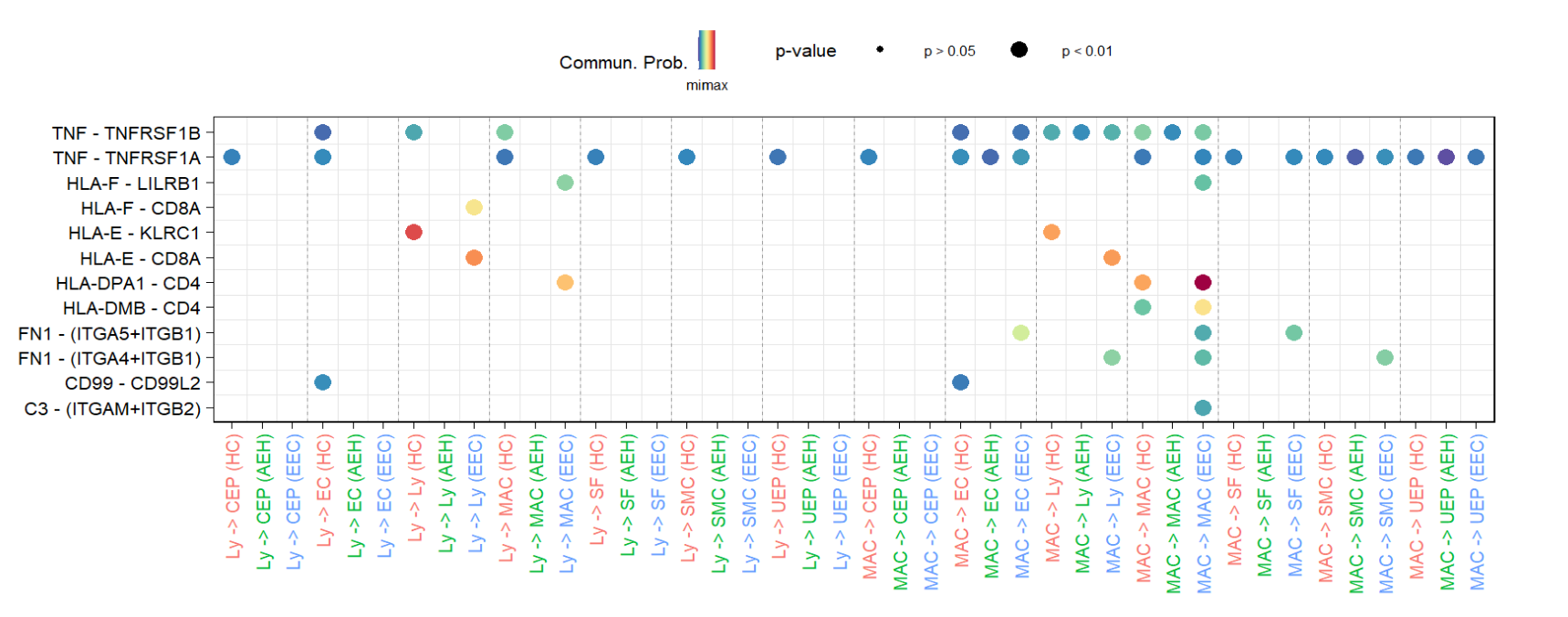
p101_CellChat/03_气泡图可视化/2023-7-4_cellchat多组受配体气泡图/p1.png
共 8 张:点缩略图切换主图,下载按钮跟随当前主图。
图源:p1.png
分析代码
8 个源码文件,按目录顺序;本机绝对路径已替换为 ~。 代码可复制,但需要按自己的数据改路径与参数。
00_通用可视化函数/2023-7-10_双侧柱状图展示细胞通讯数目/双侧柱状图展示互作数目.r
setwd('D:/KS项目/公众号文章/双侧柱状图展示细胞通讯数目')
library(CellChat)
load("D:/KS项目/公众号文章/双侧柱状图展示细胞通讯数目/Cellchat.RData")
#==============================================================================
#                   1、对于cellchat结果
#==============================================================================
#假设我们已经完成了cellchat分析,得到了cellchat对象
#我们使用cellchat的netVisual_bubble函数,通过作图提取数据
#我们这里以MAC和其他细胞的互作为例
#source设置为MAC,表示MAC提供ligand
#target设置为MAC,表示MAC提供receptor
HC_MAC_ligand <- netVisual_bubble(HC,
                 sources.use = c("MAC"),
                 targets.use = c("SMC","UEP","SF","CEP","EC","Ly"))

#统计一下数量看看
table(HC_MAC_ligand$data$target)
# CEP  EC  Ly  SF SMC UEP
# 24  22  15   8   8  17

EEC_MAC_ligand <- netVisual_bubble(EEC,
                                  sources.use = c("MAC"),
                                  targets.use = c("SMC","UEP","SF","CEP","EC","Ly"))


HC_MAC_receptor <- netVisual_bubble(HC,
                                  sources.use = c("SMC","UEP","SF","CEP","EC","Ly"),
                                  targets.use = c("MAC"))

table(HC_MAC_receptor$data$source)
# CEP  EC  Ly  SF SMC UEP
# 71  60  12  64  52  37

EEC_MAC_receptor <- netVisual_bubble(EEC,
                                   sources.use = c("SMC","UEP","SF","CEP","EC","Ly"),
                                   targets.use = c("MAC"))


#之后我们分别将ligand和receptor的数据提取合并
#### MAC提供ligand-------------------------------------------------------------
ligand_cellchat <- cbind(as.data.frame(table(HC_MAC_ligand$data$target)),
                         as.data.frame(table(EEC_MAC_ligand$data$target)))

ligand_cellchat <- ligand_cellchat[,-3]
colnames(ligand_cellchat) <- c('celltype', 'HC','EEC')
#添加一列计算比例
ligand_cellchat$ratio <- ligand_cellchat$EEC/ligand_cellchat$HC
#取log
ligand_cellchat$ratio <- log2(ligand_cellchat$ratio)


#### MAC提供receptor-----------------------------------------------------------
receptor_cellchat <- cbind(as.data.frame(table(HC_MAC_receptor$data$source)),
                         as.data.frame(table(EEC_MAC_receptor$data$source)))

receptor_cellchat <- receptor_cellchat[,-3]
colnames(receptor_cellchat) <- c('celltype', 'HC','EEC')
#添加一列计算比例
receptor_cellchat$ratio <- receptor_cellchat$EEC/receptor_cellchat$HC
#取log
receptor_cellchat$ratio <- log2(receptor_cellchat$ratio)


#有了数据就可以作图了,我们使用ggplot2作图
#数据转化一下
library(reshape2)
ligand <-melt(ligand_cellchat, id.vars = c("celltype"), #需保留的不参与聚合的变量列名
                  measure.vars = 2:3,#选择需要转化的列
                  variable.name = c('group'),#聚合变量的新列名
                  value.name = 'number')#聚合值的新列名

#为了区分左右,我们将HC的数据乘以-1
ligand$number <- ifelse(ligand$group=="HC", ligand$number* -1, ligand$number*1)
ligand$ratio <- c(ligand_cellchat$ratio,ligand_cellchat$ratio)
ligand$ratio_color <- ifelse(ligand$ratio>0, "red", "black")


p_ligand <- ggplot(data=ligand,aes(x=celltype))+
  geom_col(aes(y=number,fill=group))+#柱状图
  geom_point(aes(y=ratio*30,color=ratio_color),shape=16,size=3)+#点,为了坐标轴一致,点乘以30
  theme_bw()+
  scale_y_continuous(name = "# of interaction pairs",#双坐标轴,点的坐标轴是柱子坐标轴/30
                     sec.axis = sec_axis( trans=~./30, name="Log2(# of interaction pairs in EEC/\n # of interaction pairs in HC)"))+
  scale_fill_manual(values = c('#119781',"#3B5081"))+
  scale_color_manual(values = c("black",'red'))+#颜色修改
  coord_flip()+#反转
  scale_x_discrete(position = c("top"))+#坐标轴移动
  geom_text(data = ligand[which(ligand$number>0),],aes(y=number,label=abs(number)),
            hjust=1.2, size=4, color='white')+#柱子上添加数字
  geom_text(data = ligand[which(ligand$number<0),],aes(y=number,label=abs(number)),
            hjust=-0.2, size=4, color="white")+
  theme(panel.grid.major=element_blank(),
        panel.grid.minor=element_blank(),
        legend.title = element_blank(),
        axis.text = element_text(color="black",size=10),
        legend.position = 'none',
        axis.title.y.right = element_blank())+
  annotate(geom = 'text', label="HC\nMAC\ncells", x=4, y=-20,size=4,color='#119781')+
  annotate(geom = 'text', label="EEC\nMAC\ncells", x=4, y=30,size=4,color='#3B5081')+
  theme(plot.margin = margin(50, 50, 50, 50))


#左侧添加一个标题,位置需要自己根据实际情况调整
library(grid)
grid.draw(grid.text(label = "Cell types interacting with MAC\n(providing receptor)",
                    x = unit(0.09, "npc"), #位置调整
                    y = unit(0.5, "npc"),
                    rot = 90,#角度
                    gp = gpar(fontsize = 12)))#大小


#-----------------------------------------------------------------------------

#receptor的数据处理和作图与ligand一样,作图注意调整一些细节即可
library(reshape2)
receptor <-melt(receptor_cellchat, id.vars = c("celltype"), #需保留的不参与聚合的变量列名
              measure.vars = 2:3,#选择需要转化的列
              variable.name = c('group'),#聚合变量的新列名
              value.name = 'number')#聚合值的新列名

#为了区分左右,我们将HC的数据乘以-1
receptor$number <- ifelse(receptor$group=="HC", receptor$number* -1, receptor$number*1)
receptor$ratio <- c(receptor_cellchat$ratio,receptor_cellchat$ratio)
receptor$ratio_color <- ifelse(receptor$ratio>0, "red", "black")


p_receptor <- ggplot(data=receptor,aes(x=celltype))+
  geom_col(aes(y=number,fill=group))+#柱状图
  geom_point(aes(y=ratio*30,color=ratio_color),shape=16,size=3)+#点,为了坐标轴一致,点乘以30
  theme_bw()+
  scale_y_continuous(name = "# of interaction pairs",#双坐标轴,点的坐标轴是柱子坐标轴/30
                     sec.axis = sec_axis( trans=~./30, name="Log2(# of interaction pairs in EEC/\n # of interaction pairs in HC)"))+
  scale_fill_manual(values = c('#119781',"#3B5081"))+
  scale_color_manual(values = c("black",'red'))+#颜色修改
  coord_flip()+#反转
  scale_x_discrete(position = c("top"))+#坐标轴移动
  geom_text(data = receptor[which(receptor$number>0),],aes(y=number,label=abs(number)),
            hjust=1.2, size=4, color='white')+#柱子上添加数字
  geom_text(data = receptor[which(receptor$number<0),],aes(y=number,label=abs(number)),
            hjust=-0.2, size=4, color="white")+
  theme(panel.grid.major=element_blank(),
        panel.grid.minor=element_blank(),
        legend.title = element_blank(),
        axis.text = element_text(color="black",size=10),
        legend.position = 'none',
        axis.title.y.right = element_blank())+
  annotate(geom = 'text', label="HC\nMAC\ncells", x=3, y=-40,size=4,color='#119781')+
  annotate(geom = 'text', label="EEC\nMAC\ncells", x=3, y=40,size=4,color='#3B5081')+
  theme(plot.margin = margin(50, 50, 50, 50))


#左侧添加一个标题,位置需要自己根据实际情况调整
library(grid)
grid.draw(grid.text(label = "Cell types interacting with MAC\n(providing ligand)",
                    x = unit(0.09, "npc"), #位置调整
                    y = unit(0.5, "npc"),
                    rot = 90,#角度
                    gp = gpar(fontsize = 12)))#大小


#==============================================================================
#                   2、对于cellphonedb结果
#==============================================================================

参考:
https://mp.weixin.qq.com/s?__biz=Mzg5OTYzMzY5Ng==&mid=2247486666&idx=1&sn=6f7f807388e212e97d616b79d31562b9&chksm=c0510b85f7268293cfc7330aefb9773b7cfad161b6a8e314194031ac886c03bef876d5074d2c&token=985484555&lang=zh_CN#rd


#利用作图提取统计数据

#设置好sourece、target cell,然后提取受配体,利用table函数统计数目即可
01_cellchat/02_数据库更新与自定义/cellchat数据库更新及自定义.r
#=========================================================================
#            Cellchat分析受配体数据库更新(自定义)
#=========================================================================
#我们分析细胞互作,其实最主要的依赖是数据库,受配体数据库限制了结果
#这也就是为什么有些小伙伴提出疑问,cpdb和cellchat分析的结果不一样
#一方面是算法方式不同,另一方面则是数据库不一致。

#cellchat一般情况我们都选择默认的数据库,但是它也提供了两种方式供大家选择
#一种是函数链接其他数据库(例如cpdb的受配体数据库)进行更新,一种是手动更新
#这在一定程度上拓展了分析,还是很有用的!

devtools::install_github("jinworks/CellChat")
library(CellChat)
#version 2.1.2
setwd("D:\\KS项目\\公众号文章\\cellchat受配体数据库更新及自定义")

#=========================================================================
#        方式1;Cellchat V2提供的updateCellChatDB函数进行更新
#=========================================================================
#看看这个函数的参数

help(updateCellChatDB)
# updateCellChatDB(
#   db, #一个数据框,至少需要两列,一列是ligand一列是receptor。当然还可以提供受配体的其他信息,例如通路等等
#   gene_info = NULL, #基因信息,数据框至少有一列Symbol。当设置为NULL,需要提供物种信息,也就是后面的species_target参数,是human还是mouse
#   other_info = NULL,#非必要信息
#   trim.pathway = FALSE,#当db提供pathway_name的时候,是否删除没有pathway names的interactions
#   merged = FALSE,#是否将input的database与现有的cellchat数据库合并,选择T,则需要供物种信息。如果是自定义添加LR信息,那么还是选择T,合并一下
#   species_target = NULL
# )

#想查看cellchat数据的数据格式,可以运行数据库,参考一下
CellChatDB.human


#-------------------------------------------------------------------------------
#1、cellphonedb数据库
#因为在很多文章中,以及我们的教程中,单细胞互作分析除了cellchat就是cpdb1了
#所以我们先说说cpdb数据库(目前更新到V5了)添加到cellchat数据库
#cpdb数据库文件格式与cellchat类似,很容易进行整合

#cpdb数据库文件需要在cpdb github官网自行下载:https://github.com/ventolab/cellphonedb-data
#需要下载的文件在上面这个网址中的data文件夹,这里我已经下载好了:
#只需要gene_input.csv、interaction_input.csv、complex_input.csv即可
#可以打开看看其数据格式(!!!注意,cpdb数据库只是人的):
.
├── complex_input.csv
├── gene_input.csv #基因信息对应updateCellChatDB函数的gene_info参数
├── interaction_input.csv #受配体数据,对应updateCellChatDB函数的db参数
├── protein_input.csv #其他信息,对应other_info参数
└── transcription_factor_input.csv


#Step 1: 加载数据库文件
interaction_input <- read.csv(file = './cpdb数据库文件/interaction_input.csv')
complex_input <- read.csv(file = './cpdb数据库文件/complex_input.csv', row.names = 1)
geneInfo <- read.csv(file = './cpdb数据库文件/gene_input.csv')

#Step 2: 修改文件,以期让其适用于cellchat

#gene information---需要有一列列名是“Symbol”
geneInfo$Symbol <- geneInfo$hgnc_symbol#将基因名那一列命名为Symbol
geneInfo <- select(geneInfo, -c("ensembl"))
geneInfo <- unique(geneInfo)#去除重复行

#interaction_input---获取受配体信息(选择有用的,去除冗余的信息)
# get the ligand information---添加一列ligand,并将其转化为symbol(大家熟悉的形式,cpdb这里写的是protein uniprot)
idx_partnerA <- match(interaction_input$partner_a, geneInfo$uniprot)
idx.use <- !is.na(idx_partnerA)
interaction_input$ligand <- interaction_input$partner_a
interaction_input$ligand[idx.use] <- geneInfo$hgnc_symbol[idx_partnerA[idx.use]]
# get the receptor information---添加一列receptor
idx_partnerB <- match(interaction_input$partner_b, geneInfo$uniprot)
idx.use <- !is.na(idx_partnerB)
interaction_input$receptor <- interaction_input$partner_b
interaction_input$receptor[idx.use] <- geneInfo$hgnc_symbol[idx_partnerB[idx.use]]

# get other information
interaction_input$interaction_name <- interaction_input$interactors
interaction_input$interaction_name_2 <- interaction_input$interaction_name
interaction_input$pathway_name <- interaction_input$classification
interaction_input$pathway_name <- gsub(".*by ", "", interaction_input$pathway_name)
interaction_input$annotation <- interaction_input$directionality
interaction_input <- select(interaction_input, -c("partner_a","partner_b","protein_name_a","protein_name_b","interactors","classification","directionality"))


##other_info---prepare complex_input file
complexsubunits <- dplyr::select(complex_input, starts_with("uniprot"))
for (i in 1:ncol(complexsubunits)) {
  idx_complex <- match(complex_input[,paste0("uniprot_",i)], geneInfo$uniprot)
  idx.use <- !is.na(idx_complex)
  complex_input[idx.use,paste0("uniprot_",i)] <- geneInfo$hgnc_symbol[idx_complex[idx.use]]
}
colnames(complex_input)[1:ncol(complexsubunits)] <- paste0("subunit_",seq_len(ncol(complexsubunits)))
complex_input <- dplyr::select(complex_input, starts_with("subunit"))

## prepare other information
other_info <- list(complex = complex_input)


#Step 3: 更新数据库
#这里为什么trim.pathway选择T,一定要让interactions有pathways注释,这是因为:
#Warning: If no pathway information of each L-R pair is provided, all pathway-level analysis from CellChat cannot be used, such as computeCommunProb!


#仅仅只有cpdb数据库
db.new.cpdb <- updateCellChatDB(db = interaction_input, gene_info = geneInfo, other_info = other_info, trim.pathway = T,species_target = "human",merged = F)
#将cpdb数据库和cellchat合并
db.new.cpdb_ccdb <- updateCellChatDB(db = interaction_input, gene_info = geneInfo, other_info = other_info, trim.pathway = T,species_target = "human",merged = T)

#保存文件,后续分析直接使用
save(db.new.cpdb, file = 'db_new_cpdb.RData')
save(db.new.cpdb_ccdb, file = 'db.new.cpdb_ccdb.RData')


#在后续进行cellchat分析选择数据库的时候,就可以直接使用这个重新构建的
#当然了,官网也提供了其他的数据库用于cellchat数据库重建,感兴趣的自行学习。


#=========================================================================
#        方式2;自定义构建数据库相关文件
#=========================================================================
#如前面所说第二种方式就是自己按照cellchat数据库构建需要的文件格式进行构建
#这种情况主要适用于新的受配体未被记录或者其他数据库记载的情况
#以及其他物种(非人、非小鼠)的互作分析数据构建


#首先我们可以查下cellchat数据库里面的文件格式
#我们这里查看mouse的,后面有妙用
CellChatDB <- CellChatDB.mouse
class(CellChatDB)#它是一个list,里面包含4个文件,即4个dataframe
# [1] "list"

#那么如果我们要添加一些interaction信息或者修改,直接下载这些文件手动调整即可
#如果是其他物种,那么可以按照相同的格式整理文件即可

interaction_input <- CellChatDB$interaction
complex_input <- CellChatDB$complex
cofactor_input <- CellChatDB$cofactor
geneInfo <- CellChatDB$geneInfo
write.csv(interaction_input, file = "interaction_input_CellChatDB.csv")
write.csv(complex_input, file = "complex_input_CellChatDB.csv")
write.csv(cofactor_input, file = "cofactor_input_CellChatDB.csv")
write.csv(geneInfo, file = "geneInfo_input_CellChatDB.csv")

#Excel中打开,就能具体查看到底有什么信息
#然后直接修改即可
#文件按照要求修改之后,读入对应的文件

interaction_input <- read.csv(file = 'interaction_input_CellChatDB.csv', row.names = 1)
complex_input <- read.csv(file = 'complex_input_CellChatDB.csv', row.names = 1)
cofactor_input <- read.csv(file = 'cofactor_input_CellChatDB.csv', row.names = 1)
geneInfo <- read.csv(file = ' geneInfo_input_CellChatDB.csv', row.names = 1)


#cellchat数据库是list形式,所以将修改好的文件(4个dataframe)以list形式储存即可


CellChatDB <- list()
CellChatDB$interaction <- interaction_input
CellChatDB$complex <- complex_input
CellChatDB$cofactor <- cofactor_input
CellChatDB$geneInfo <- geneInfo


#最后在分析中就可以使用了
01_cellchat/05_互作网络图/cellchatv2互作网络函数.r
ks_cellchatV2_sig_interCount <- function(cellchat, #cellchat object
                                         count=T, #使用互作count还是weight
                                         source_celltype,#source celltype
                                         showInter=F,#是否展示互作数目(节点颜色和大小是否设置为互作数目,False则代表节点设置为固定大小或celltype 细胞数)
                                         color_set=NULL,#celltype颜色设置
                                         celltype_order=NULL,#celltype颜色设置,与color set一致
                                         celltype.size=F,#是否展示celltype数量。
                                         flipped=T#连线设置
                                         ){

  require("reshape2")
  require("ggplot2")
  require("ggraph")
  require("tidygraph")
  require("dplyr")
  require("igraph")
  require("CellChat")

  if(count==T){
    mat <- as.data.frame(cellchat@net$count)
  }else{
    mat <- as.data.frame(cellchat@net$weight)
  }


  sourecell <- which(colnames(mat)==source_celltype)
  mat <- mat[order(mat[,sourecell], decreasing = TRUE),]#inter排列

  group.size <- as.data.frame(table(cellchat@idents))


  df <- data.frame(from = rep(source_celltype,nrow(mat)),
                   to = rownames(mat),
                   inter = mat[,source_celltype])


  #节点数据
  nodes <- data.frame(name = df$to)
  nodes$inter <- df$inter

  if(celltype.size==F){

    size = rep(5, nrow(mat))
    nodes$size <- size
    nodes <- nodes[order(nodes[,"inter"], decreasing = TRUE),]

  }else{

    colnames(group.size) <- c('name',"size")
    nodes = merge(nodes, group.size, by='name', all=F)

    nodes <- nodes[order(nodes[,"size"], decreasing = TRUE),]

  }


  edges <- df[c("from","to","inter")]

  #设置celltype颜色
  if(is.null(color_set)){

    color.use <- c("#D51F26","#272E6A","#208A42","#89288F","#F47D2B", "#FEE500","#8A9FD1","#C06CAB", "#D8A767",
                            "#90D5E4", "#89C75F","#F37B7D","#9983BD","#D24B27","#3BBCA8", "#6E4B9E","#0C727C", "#7E1416")

    color.use <- color.use[1:nrow(mat)]
    names(color.use) <- df$to

  }else{

    color.use <- color_set

    if(is.null(celltype_order)){

      names(color.use) <- df$to

    }else{

      names(color.use) <- celltype_order
    }

  }


  #构建作图数据
  net <- tbl_graph(nodes = nodes, edges = edges)


  #plot
  p=ggraph(net,layout='igraph', algorithm = 'circle') +
    geom_edge_bend(mapping = aes(edge_width = inter),
                   strength = 0.2,alpha = 0.8,
                   flipped =flipped, edge_color = "#A9AAAA",
                   n=50, show.legend = F,
                   check_overlap =T)+
    geom_edge_loop(aes(edge_width = inter,
                       direction = (from - 1)*360 / length(net)),
                   colour = "#A9AAAA",
                   alpha = 0.5, show.legend = F)+
    scale_edge_width_continuous(range = c(0,5))


  if(showInter==F){

    p = p+geom_node_point(aes(size=size,colour = name), show.legend = F) +
      geom_node_point(aes(size=size), show.legend = F,
                      shape=21,colour = 'black',stroke = 1.5)+
      geom_node_text(aes(x = x*1.06, y=y*1.06, label=name),
                     angle=0,hjust=0, size=3) + # 设置点的注释
      scale_size_continuous(range = c(1, 15))+
      scale_color_manual(values = color.use)+
      theme_graph()+
      theme(plot.margin = unit(c(2, 2, 2, 2), "cm"))

  }else{

    if(celltype.size==T){

      p = p+geom_node_point(aes(size=size,colour = inter)) +
        geom_node_point(aes(size=size), show.legend = F,
                        shape=21,colour = 'black',stroke = 1.5)+
        geom_node_text(aes(x = x*1.06, y=y*1.06, label=name),
                       angle=0,hjust=0, fontface="bold",size=3) + # 设置点的注释
        scale_color_gradientn(colors = colorRampPalette(c("#2166AC",'#478ABF','#90C0DC', "white",'#EF8C65','#CF4F45',"#B2182B"))(100))+
        scale_size_continuous(range = c(1, 10))+
        theme_graph()+
        theme(plot.margin = unit(c(2, 2, 2, 2), "cm"))

    }else{

      p = p+geom_node_point(aes(size=inter,colour = inter)) +
        geom_node_point(aes(size=inter), show.legend = F,
                        shape=21,colour = 'black',stroke = 1.5)+
        geom_node_text(aes(x = x*1.06, y=y*1.06, label=name),
                       angle=0,hjust=0, fontface="bold",size=3) + # 设置点的注释
        scale_color_gradientn(colors = colorRampPalette(c("#2166AC",'#478ABF','#90C0DC', "white",'#EF8C65','#CF4F45',"#B2182B"))(100))+
        scale_size_continuous(range = c(1, 10))+
        theme_graph()+
        theme(plot.margin = unit(c(2, 2, 2, 2), "cm"))

    }

  }

  return(p)

}


ks_cellchatV2_sig_interCount(cellchat = MDA.cellchat,
                               source_celltype = "ECs",
                               count = T,
                               celltype.size=F,
                               showInter=F,
                               flipped=F)


# plot_list <- list()
# sourceCells <- c("ECs","Tcell","SMCs","Mon")
#
# for (i in 1:length(sourceCells)) {
#
#   p = ks_cellchatV2_sig_interCount(cellchat = MDA.cellchat,
#                                    source_celltype = sourceCells[i],
#                                    count = T,
#                                    celltype.size=T,
#                                    showInter=T,
#                                    flipped=F)
#   plot_list[[i]] <- p
#
# }
#
#
# library(cowplot)
# plot_grid(plot_list[[1]],plot_list[[2]],
#           plot_list[[3]],plot_list[[4]],ncol = 2)
01_cellchat/05_互作网络图/(演示)互作网络图.r
setwd('D:\\KS项目\\公众号文章\\复现SCI文章图表之ggrpah网络互作图')

#===============================================================================
#                     一、cellchat
#===============================================================================


library(CellChat)
library(ggraph)
library(tidygraph)
library(dplyr)
#获取互作数据
#获取数据,这里我们以ECs与其他细胞的互作为例子
# mat <- as.data.frame(cellchat@net$weight)
# group.size <- as.data.frame(table(cellchat@idents))
#
# write.csv(mat, file = 'mat.csv')
# write.csv(group.size, file = 'group.size.csv')


mat <- read.csv("mat.csv", header = T, row.names = 1, check.names = F)
group.size <- read.csv('group.size.csv',header = T, row.names = 1)
colnames(group.size) <- c('celltype',"cellnum")

#如果你需要调整展示的celltype顺序,那么就需要调整一下,这里我是以celltyep的细胞量来调整了
group.size <- group.size[order(group.size$cellnum, decreasing = TRUE),]
#构建数据,这里我们以B细胞对其他细胞的互作为例子
df <- data.frame(from = rep("Bcells",nrow(mat)),
                 to = rownames(mat),
                 inter = mat[,"Bcells"])
#设置一下排序,让celltype按照从大到小排列
df <- arrange(df, factor(to, levels = group.size$celltype))

#设置celltype颜色
color.use <- c("#D51F26","#272E6A","#208A42","#89288F","#F47D2B", "#FEE500","#8A9FD1","#C06CAB", "#D8A767",
               "#90D5E4", "#89C75F","#F37B7D","#9983BD","#D24B27","#3BBCA8", "#6E4B9E","#0C727C", "#7E1416")

names(color.use) <- group.size$celltype


#节点数据
nodes <- data.frame(name = unique(union(df$from, df$to)))
nodes$size <- group.size$cellnum


#边数据
edges <- df[c("from","to","inter")]

#构建作图数据
data <- tbl_graph(nodes = nodes, edges = edges)

#plot
ggraph(data,layout='igraph', algorithm = 'circle') +
  geom_edge_bend(mapping = aes(edge_width = inter),
                 strength = 0.2,alpha = 0.5,
                 flipped =T, edge_color = "#A9AAAA",
                 n=50, show.legend = F,
                 check_overlap =T)+
  geom_edge_loop(aes(edge_width = inter,
                     direction = (from - 1)*360 / length(data)),
                 colour = "#A9AAAA",
                 alpha = 0.5, show.legend = F)+
  scale_edge_width_continuous(range = c(0,5))+
  geom_node_point(aes(size=size,colour = name)) +
  geom_node_point(aes(size=size), show.legend = F,
                  shape=21,colour = 'black',stroke = 1.5)+
  geom_node_text(aes(x = x*1.06, y=y*1.06, label=name),
                 angle=0,hjust=0, fontface="bold",size=3) + # 设置点的注释
  scale_size_continuous(range = c(1, 15))+
  scale_color_manual(values = color.use)+
  theme_graph()


#plot node颜色设置为连续型
nodes$inter <- df$inter
data1 <- tbl_graph(nodes = nodes, edges = edges)
ggraph(data1,layout='igraph', algorithm = 'circle') +
  geom_edge_bend(mapping = aes(edge_width = inter),
                 strength = 0.2,alpha = 0.5,
                 flipped =T, edge_color = "#A9AAAA",
                 n=50, show.legend = F,
                 check_overlap =T)+
  geom_edge_loop(aes(edge_width = inter,
                     direction = (from - 1)*180 / length(data1)),
                 colour = "#A9AAAA",
                 alpha = 0.5, show.legend = F)+
  scale_edge_width_continuous(range = c(0,5))+
  geom_node_point(aes(size=size,colour = inter)) +
  geom_node_point(aes(size=size), show.legend = F,
                  shape=21,colour = 'black',stroke = 1.5)+
  geom_node_text(aes(x = x*1.06, y=y*1.06, label=name),
                 angle=0,hjust=0, fontface="bold",size=3) + # 设置点的注释
  scale_color_gradientn(colors = colorRampPalette(c("#2166AC",'#478ABF','#90C0DC', "white",'#EF8C65','#CF4F45',"#B2182B"))(100))+
  scale_size_continuous(range = c(1, 15))+
  theme_graph()


#===============================================================================
#===============================================================================
#===============================================================================
mat_count <- as.data.frame(CTL_cellchat@net$count)
write.csv(mat_count, file = 'mat_count.csv')

mat_count <-  read.csv("mat_count.csv", header = T, row.names = 1, check.names = F)
mat_count <- mat_count[order(mat_count$Mono2, decreasing = TRUE),]

mat1 <- mat[rownames(mat_count),]

#构建数据
df2 <- data.frame(from = rep("Mono2",nrow(mat_count)),
                 to = rownames(mat_count),
                 inter = mat1$Mono2,
                 inter_num = mat_count[,"Mono2"])
#设置celltype颜色
color.use <- c("#D51F26","#272E6A","#208A42","#89288F","#F47D2B", "#FEE500","#8A9FD1","#C06CAB", "#D8A767",
                        "#90D5E4", "#89C75F","#F37B7D","#9983BD","#D24B27","#3BBCA8", "#6E4B9E","#0C727C", "#7E1416")

names(color.use) <- df2$to


#节点数据
nodes <- data.frame(name = unique(union(df2$from, df2$to)))
nodes$inter_num <- df2$inter_num
nodes$inter <- df2$inter

#边数据
edges <- df2[c("from","to","inter","inter_num")]

#构建作图数据
data2 <- tbl_graph(nodes = nodes, edges = edges)
#plot
ggraph(data2,layout='igraph', algorithm = 'circle') +
  geom_edge_bend(mapping = aes(edge_width = inter_num),
                 strength = 0.2,alpha = 0.5,
                 flipped =T, edge_color = "#A9AAAA",
                 n=50, show.legend = F,
                 check_overlap =T)+
  geom_edge_loop(aes(edge_width = inter_num,
                     direction = (from - 1)*180 / length(data2)),
                 colour = "#A9AAAA",
                 alpha = 0.5, show.legend = F)+
  scale_edge_width_continuous(range = c(0,5))+
  geom_node_point(aes(size=inter_num,colour = inter_num)) +
  geom_node_point(aes(size=inter_num), show.legend = F,
                  shape=21,colour = 'black',stroke = 1.5)+
  geom_node_text(aes(x = x*1.06, y=y*1.06, label=name),
                 angle=0,hjust=0, fontface="bold",size=3) + # 设置点的注释
  scale_color_gradientn(colors = colorRampPalette(c("#2166AC",'#478ABF','#90C0DC', "white",'#EF8C65','#CF4F45',"#B2182B"))(100))+
  scale_size_continuous(range = c(1, 15))+
  theme_graph()


#===============================================================================
#                          二、cellphonedb
#===============================================================================

#===============================================================================
#                          互作数目热图展示
#===============================================================================
setwd('D:\\KS项目\\公众号文章\\cellphonedb V5细胞通讯教程\\output')

#我们还是使用ktplots包好了
# devtools::install_github("zktuong/ktplots",force = TRUE)
library(ktplots)

#load results data
sig_p <- read.delim("./statistical_analysis_pvalues_12_21_2023_170246.txt", check.names = F)

#figure1
p= plot_cpdb_heatmap(pvals = sig_p,
                     display_numbers=T,
                  width=8, height =8,
                  number_format = "%.0f",
                  number_color = 'black')
02_cellphonedb/01_v5分析教程/prepar_input_for_cpdb5.r
library(Seurat)


#data1: normalized counts file
#assay提前设置好,我这里示例数据是默认的RNA就不再设置了
# DefaultAssay(scRNA_Y16) <- "RNA"
Normalized_counts <-GetAssayData(scRNA_Y16, layer = 'data')
Normalized_counts <- as.data.frame(Normalized_counts)
#有些基因表达量在所有细胞中都是0,我选择过滤掉,可以减少矩阵大小,而且这些基因也没有作用
# Normalized_counts$mean_exp = rowMeans(Normalized_counts)
# Normalized_counts <- Normalized_counts[which(Normalized_counts$mean_exp >0.001),]
# Normalized_counts <- Normalized_counts[,-ncol(Normalized_counts)]
Normalized_counts=cbind(rownames(Normalized_counts),Normalized_counts)#增加一列
colnames(Normalized_counts)[1]='Gene'#将基因名一列命名


#data2: metadata file (contain cellbarcodes and cell labels)
metadata <-  data.frame(Cell = rownames(scRNA_Y16@meta.data), cell_type = scRNA_Y16$celltype)
metadata$cell_type=gsub(' ','_',metadata$cell_type)#将空格用_代替
# meta_data[is.na(meta_data)] = "Unkown" #NA或者NULL的celltype用unknow代替
# meta_data[is.null(meta_data)] = "Unkown" #NA或者NULL的celltype用unknow代替

#保存文件
write.table(Normalized_counts, "Normalized_counts.txt",  row.names=F, sep='\t',quote = F)
write.table(metadata, "cellphonedb_meta.txt", row.names=F, sep='\t',quote = F)
02_cellphonedb/06_互作网络图/cellphonedbv5网络图函数.r
ks_cpdb_sig_interCount <- function(pval_data,#cellphonedb V5输出结果,pval.txt文件
                                   significant=0.05,#互作显著性
                                   source_celltype,#ource celltype
                                   color_set=NULL,#celltype颜色设置
                                   celltype_order=NULL,#celltype颜色设置,与color set一致
                                   showInter=F,#是否展示互作数目(节点颜色和大小是否设置为互作数目,False则代表节点设置为固定大小或celltype 细胞数)
                                   celltype.size=F,#是否展示celltype数量。
                                   scRNA=NULL,#做cellphonedb的seurat obj
                                   cellanno=NULL,#celltype所在那一列metadata的列名
                                   group.size=F)#默认大小

  {

  requireNamespace("reshape2")
  requireNamespace("ggplot2")
  requireNamespace("ggraph")
  requireNamespace("tidygraph")
  requireNamespace("dplyr")
  requireNamespace("igraph")

  all_intr <- pval_data
  col_start <- which(colnames(all_intr) == "classification")

  intr_pairs <- all_intr$interacting_pair
  all_intr <- t(all_intr[, -c(1:col_start)])
  colnames(all_intr) <- intr_pairs
  all_count <- reshape2::melt(all_intr)

  all_count$significant <- all_count$value < significant

  count1x <- all_count %>%
    group_by(Var1) %>%
    summarise(COUNT = sum(significant)) %>%
    as.data.frame()


  tmp <- lapply(count1x[, 1], function(x) strsplit(as.character(x), "\\|"))
  tmp <- lapply(tmp, function(x) x[[1]])
  tmp <- as.data.frame(do.call(rbind, tmp))
  colnames(tmp) <- c("SOURCE", "TARGET")
  count1x <- as.data.frame(cbind(count1x, tmp))
  all_count <- count1x[, c("SOURCE", "TARGET", "COUNT")]


  if (any(all_count$COUNT) > 0) {

    count_mat <- reshape2::acast(SOURCE ~ TARGET, data = all_count, value.var = "COUNT")
    count_mat[is.na(count_mat)] <- 0

    }else{

      stop("There are no significant results using p-value of: ", significant, call. = FALSE)

    }

  # return(count_mat)


  #plot networks
  plot_mat <- as.data.frame(count_mat)
  sourecell <- which(colnames(plot_mat)==source_celltype)
  plot_mat <- plot_mat[order(plot_mat[,sourecell], decreasing = TRUE),]


  df <- data.frame(from = rep(source_celltype,nrow(plot_mat)),
                    to = rownames(plot_mat),
                    inter_num = plot_mat[,source_celltype])

  #设置celltype颜色
  if(is.null(color_set)){

    color.use <- c("#D51F26","#272E6A","#208A42","#89288F","#F47D2B", "#FEE500","#8A9FD1","#C06CAB", "#D8A767",
                            "#90D5E4", "#89C75F","#F37B7D","#9983BD","#D24B27","#3BBCA8", "#6E4B9E","#0C727C", "#7E1416")

    color.use <- color.use[1:nrow(plot_mat)]
    names(color.use) <- df$to

  }else{

    color.use <- color_set

    if(is.null(celltype_order)){

      names(color.use) <- df$to

    }else{

      names(color.use) <- celltype_order
    }

  }


  #nodes
  nodes <- data.frame(name = df$to)
  nodes$inter_num <- df$inter_num


  if(group.size==F){

    size = rep(5, nrow(plot_mat))
    nodes$size <- size

  }else{

    metadata <- scRNA_Y16@meta.data
    celltypesize = as.data.frame(table(metadata[,cellanno]))
    colnames(celltypesize) <- c('name',"size")
    nodes = merge(nodes, celltypesize, by='name', all=F)

    nodes <- nodes[order(nodes[,"size"], decreasing = TRUE),]

  }

  #edge
  edges <- df[c("from","to","inter_num")]

  #network plot
  net <- tbl_graph(nodes = nodes, edges = edges)

  #plot
  p=ggraph(net,layout='igraph', algorithm = 'circle') +
    geom_edge_bend(mapping = aes(edge_width = inter_num),
                   strength = 0.2,alpha = 0.8,
                   flipped =F, edge_color = "#A9AAAA",
                   n=50, show.legend = F,
                   check_overlap =T)+
    geom_edge_loop(aes(edge_width = inter_num,
                       direction = (from - 1)*360 / length(net)),
                   colour = "#A9AAAA",
                   alpha = 0.5, show.legend = F)+
    scale_edge_width_continuous(range = c(0,5))


  if(showInter==F){


    p = p+geom_node_point(aes(size=size,colour = name), show.legend = F) +
      geom_node_point(aes(size=size), show.legend = F,
                      shape=21,colour = 'black',stroke = 1.5)+
      geom_node_text(aes(x = x*1.06, y=y*1.06, label=name),
                     angle=0,hjust=0, size=3) + # 设置点的注释
      scale_size_continuous(range = c(1, 15))+
      scale_color_manual(values = color.use)+
      theme_graph()+
      theme(plot.margin = unit(c(2, 2, 2, 2), "cm"))

  }else{

    if(celltype.size==T){

      p = p+geom_node_point(aes(size=size,colour = inter_num)) +
        geom_node_point(aes(size=size), show.legend = F,
                        shape=21,colour = 'black',stroke = 1.5)+
        geom_node_text(aes(x = x*1.06, y=y*1.06, label=name),
                       angle=0,hjust=0, fontface="bold",size=3) + # 设置点的注释
        scale_color_gradientn(colors = colorRampPalette(c("#2166AC",'#478ABF','#90C0DC', "white",'#EF8C65','#CF4F45',"#B2182B"))(100))+
        scale_size_continuous(range = c(1, 10))+
        theme_graph()+
        theme(plot.margin = unit(c(2, 2, 2, 2), "cm"))

    }else{

      p = p+geom_node_point(aes(size=inter_num,colour = inter_num)) +
        geom_node_point(aes(size=inter_num), show.legend = F,
                        shape=21,colour = 'black',stroke = 1.5)+
        geom_node_text(aes(x = x*1.06, y=y*1.06, label=name),
                       angle=0,hjust=0, fontface="bold",size=3) + # 设置点的注释
        scale_color_gradientn(colors = colorRampPalette(c("#2166AC",'#478ABF','#90C0DC', "white",'#EF8C65','#CF4F45',"#B2182B"))(100))+
        scale_size_continuous(range = c(1, 10))+
        theme_graph()+
        theme(plot.margin = unit(c(2, 2, 2, 2), "cm"))

    }


  }

  return(p)


}


ks_cpdb_sig_interCount(pval_data = sig_p,
                       significant=0.05,
                       source_celltype = "IN_ID",
                       showInter=T,
                       celltype.size=T,
                       scRNA = scRNA_Y16,
                       cellanno = 'celltype',
                       group.size = T)
03_nichenet/01_基础分析流程/01_nichenet主分析流程.r
# ================================================================================
# NicheNet V2 单细胞细胞通讯主分析流程(可复用模板)
# 功能: 预测 sender 细胞哪些配体影响 receiver 细胞的靶基因表达
#       → 配体活性排序 + 靶基因/受体推断 + sender-focused 分析
#
# ▸ 适用前提(nichenetr 的硬性条件):
#   需要「至少两组条件」(如 对照 vs 处理/疾病), 用条件间的差异基因定义 geneset_oi。
#   只有稳态样本(无组间比较) 不适合 NicheNet, 请改用 CellChat/CellPhoneDB。
# ▸ 数据前提: 已聚类/注释好的 Seurat 对象, 含 celltype(细胞类型) + group(条件分组)
#
# ═══ 复用方法 ═══
#   1. 只改下方「★ 配置区」的参数块, 其余代码不用动
#   2. source() 全量运行, 或逐段运行观察中间结果
#   3. 可视化出图请看 02_NicheNet可视化出图.R (与本文共用同一配置区)
#
# 素材来源: KS 教程 1-基本分析流程/Nichenet-V2-单细胞通讯分析.R (整理为参数化模板)
# 版本: nichenetr 2.2.x, 兼容 Seurat V3/V4/V5
# ================================================================================

rm(list = ls())
library(nichenetr)
library(Seurat)
library(SeuratObject)
library(tidyverse)
library(patchwork)

# --------------------------------------------------------------------------------
# ★★ 配置区 (每次分析只改这里) ★★
# --------------------------------------------------------------------------------

# --- 数据路径 ---
# 先验模型数据: 本机已备好, 见 ../05_共享数据/README.md (人/鼠网盘链接也在其中)
# ⚠️ 提示: 05_共享数据 里的先验模型已下载好, 直接引用即可, 无需去 zenodo 重新下载
prior_dir <- Sys.getenv("NICHE_PRIOR", unset = "../05_共享数据")
# 你的 Seurat 对象路径 (支持环境变量 NICHE_OBJ 覆盖, 便于 CI/一键复用)
seurat_obj_path <- Sys.getenv("NICHE_OBJ", unset = "data/seurat_obj.RDS")

# --- 分析设定 ---
species <- "human"                             # "human" 或 "mouse"
receiver <- "Tcell"                            # receiver 细胞类型 (只能一种)
# sender 细胞类型 (含 receiver 自身也行); 支持环境变量 NICHE_SENDER 覆盖 (逗号分隔)
sender_celltypes <- if (Sys.getenv("NICHE_SENDER") != "") {
  strsplit(Sys.getenv("NICHE_SENDER"), ",")[[1]]
} else {
  c("Endo","Fib","Musc","Ker","APCs","Tcell","Mast","LY","Mela")
}
group_col <- "group"                           # 条件分组的 meta 列名
condition_oi <- "SD"                           # 感兴趣条件 (实验/处理组, 做分子)
condition_reference <- "HC"                    # 参考条件 (对照组)
celltype_col <- "celltype"                     # 细胞类型注释的 meta 列名

# --- 分析参数 ---
pct <- 0.1                                     # 定义"表达基因"的表达比例阈值
top_n_ligands <- 30                            # 取活性最高的多少个配体
targets_per_ligand <- 200                      # 每个配体取多少个靶基因 (n)
pct_geneset <- 0.1                             # FindMarkers 的 min.pct
# 是否剔除 "Other"/"Unknown" 这类未注释细胞 (TRUE 则剔除)
remove_unassigned <- TRUE
unassigned_pattern <- c("Other","Unknown","others","unassigned")

# --------------------------------------------------------------------------------
# 0. 读取先验模型 + 加载 Seurat 对象 (自动按物种选择)
# --------------------------------------------------------------------------------

# --- 0.1 读取 NicheNet 先验模型 ---
# 三个核心文件:
#   lr_network        : 潜在配体-受体结合信息 (用于识别潜在配体)
#   ligand_target_matrix : 配体调控靶基因潜力的矩阵 (target genes in rows, ligands in columns) [配体活性分析用]
#   weighted_networks : 加权整合网络 (配体-受体/配体-信号/信号-基因, 用于可视化)
if (species == "human") {
  net_dir <- file.path(prior_dir, "nichent-human-network")
} else {
  net_dir <- file.path(prior_dir, "nichenet-mouse-network")
}
lr_network <- readRDS(file.path(net_dir, paste0("lr_network_", species, "_21122021.rds")))
ligand_target_matrix <- readRDS(file.path(net_dir,
    ifelse(species == "human", "ligand_target_matrix_nsga2r_final.rds",
                             "ligand_target_matrix_nsga2r_final_mouse.rds")))
weighted_networks <- readRDS(file.path(net_dir,
    ifelse(species == "human", "weighted_networks_nsga2r_final.rds",
                             "weighted_networks_nsga2r_final_mouse.rds")))
lr_network <- lr_network %>% distinct(from, to)

# --- 0.2 加载 Seurat 对象 ---
# 若你的对象是 .RData (load 出的变量名), 把下行换成 load(seurat_obj_path) 并改好变量名
sce <- readRDS(seurat_obj_path)
cat("Seurat version:", as.character(packageVersion("Seurat")), "\n")
cat("cells:", ncol(sce), " | genes:", nrow(sce), "\n")
print(table(sce$group, sce$celltype))

# 可选: 剔除未注释细胞
if (remove_unassigned) {
  keep <- !sce$celltype %in% unassigned_pattern
  sce <- subset(sce, cells = colnames(sce)[keep])
  cat("after removing unassigned cells:", ncol(sce), "cells\n")
}

# 检查 group 列是否已存在 (可用 orig.ident 映射, 见注释示例)
# sce$group <- ifelse(sce$orig.ident == "SD_scRNA", "SD", "HC")
stopifnot(all(c(group_col, celltype_col) %in% colnames(sce@meta.data)))

# ⚠️ 关键: nichenetr 的 get_expressed_genes / subset 依赖 Idents
#   必须把 active ident 设为 celltype, 否则报 "cannot xtfrm data frames"
#   ⚠️ V5 坑: 要用 $ (返回 vector), 不要用 [[ ]] (V5 返回 data.frame, Idents<- 会报错)
Idents(sce) <- sce$celltype

# ⚠️ 防呆: sender_celltypes 只保留对象里真实存在的类型
#   (get_expressed_genes 对不存在的类型会 stop, 若拼错或数据缺类型会中断整个分析)
actual_types <- unique(as.character(sce$celltype))
sender_celltypes <- intersect(sender_celltypes, actual_types)
stopifnot(length(sender_celltypes) > 0, receiver %in% actual_types)
cat("sender_celltypes (filtered):", paste(sender_celltypes, collapse = ", "), "\n")

# --------------------------------------------------------------------------------
# 1. sender-agnostic: 定义一组潜在配体
#    思路: 由 receiver 表达的受体 → 反推与其匹配的配体 (暂不考虑 sender 表达)
# --------------------------------------------------------------------------------
expressed_genes_receiver <- get_expressed_genes(receiver, sce, pct = pct)

all_receptors <- unique(lr_network$to)
expressed_receptors <- intersect(all_receptors, expressed_genes_receiver)
potential_ligands <- lr_network %>%
  filter(to %in% expressed_receptors) %>%
  pull(from) %>% unique()

# sender 细胞表达的配体 (与潜在配体取交集 → sender-focused 用)
list_expressed_genes_sender <- sender_celltypes %>%
  unique() %>% lapply(get_expressed_genes, sce, pct)
expressed_genes_sender <- list_expressed_genes_sender %>% unlist() %>% unique()
potential_ligands_focused <- intersect(potential_ligands, expressed_genes_sender)

# --------------------------------------------------------------------------------
# 2. 定义感兴趣的基因集 geneset_oi (receiver 细胞两条件间差异基因)
#    NicheNet 的核心: 配体活性 = 该配体预测靶基因与 geneset_oi 的富集程度
# --------------------------------------------------------------------------------
seurat_obj_receiver <- subset(sce, idents = receiver)
DE_table_receiver <- FindMarkers(
  object = seurat_obj_receiver,
  ident.1 = condition_oi,
  ident.2 = condition_reference,
  group.by = group_col,
  min.pct = pct_geneset
) %>% rownames_to_column("gene")

# V5 列名 avg_log2FC / V4 avg_logFC — 这里同时兼容两种:
lfc_col <- if ("avg_log2FC" %in% colnames(DE_table_receiver)) "avg_log2FC" else "avg_logFC"

geneset_oi <- DE_table_receiver %>%
  filter(p_val_adj <= 0.05 & abs(.data[[lfc_col]]) >= 0.25) %>%
  pull(gene)
geneset_oi <- geneset_oi %>% .[. %in% rownames(ligand_target_matrix)]
cat("geneset_oi size:", length(geneset_oi), "\n")

# --------------------------------------------------------------------------------
# 3. 定义背景基因集 (receiver 所有表达的基因, 需在 ligand_target_matrix 中)
#    背景集一般 5000-10000, 应远大于 geneset_oi
# --------------------------------------------------------------------------------
background_expressed_genes <- expressed_genes_receiver %>%
  .[. %in% rownames(ligand_target_matrix)]
cat("background genes size:", length(background_expressed_genes), "\n")

# --------------------------------------------------------------------------------
# 4. 配体活性分析 (NicheNet 核心步骤): 对潜在配体按 AUPR 排序
# --------------------------------------------------------------------------------
ligand_activities <- predict_ligand_activities(
  geneset = geneset_oi,
  background_expressed_genes = background_expressed_genes,
  ligand_target_matrix = ligand_target_matrix,
  potential_ligands = potential_ligands
)
ligand_activities <- ligand_activities %>%
  arrange(-aupr_corrected) %>%
  mutate(rank = rank(desc(aupr_corrected)))
cat("total ligands scored:", nrow(ligand_activities), "\n")

# 可选: 直方图看 AUPR 分布, 辅助确定 top_n_ligands 截断点
# ggplot(ligand_activities, aes(x = aupr_corrected)) +
#   geom_histogram(color = "black", fill = "darkorange", bins = 50) +
#   geom_vline(xintercept = min(ligand_activities %>% top_n(top_n_ligands, aupr_corrected) %>%
#                                 pull(aupr_corrected)), color = "red", linetype = "dashed") +
#   labs(x = "ligand activity (AUPR)", y = "# ligands") + theme_classic()

best_upstream_ligands <- ligand_activities %>%
  top_n(top_n_ligands, aupr_corrected) %>%
  arrange(-aupr_corrected) %>%
  pull(test_ligand)

# --------------------------------------------------------------------------------
# 5. 推断 top 配体的靶基因 与 受体
# --------------------------------------------------------------------------------
# 活性靶基因: 每个 top 配体对 geneset_oi 内基因的调控潜能 (取前 n)
active_ligand_target_links_df <- best_upstream_ligands %>%
  lapply(get_weighted_ligand_target_links,
         geneset = geneset_oi,
         ligand_target_matrix = ligand_target_matrix,
         n = targets_per_ligand) %>%
  bind_rows() %>% drop_na()

# 受体: 与 top 配体互作潜力最高的受体
ligand_receptor_links_df <- get_weighted_ligand_receptor_links(
  best_upstream_ligands, expressed_receptors,
  lr_network, weighted_networks$lr_sig)

# --------------------------------------------------------------------------------
# 6. Sender-focused approach: 只保留 sender 细胞真正表达的配体
#    即配体活性 + sender 表达双重证据 → 更接近真实"互作"
# --------------------------------------------------------------------------------
ligand_activities_all <- ligand_activities
best_upstream_ligands_all <- best_upstream_ligands

ligand_activities <- ligand_activities %>%
  filter(test_ligand %in% potential_ligands_focused)
best_upstream_ligands <- ligand_activities %>%
  top_n(top_n_ligands, aupr_corrected) %>%
  arrange(-aupr_corrected) %>%
  pull(test_ligand) %>% unique()

# sender-focused 的靶基因/受体
active_ligand_target_links_df <- best_upstream_ligands %>%
  lapply(get_weighted_ligand_target_links,
         geneset = geneset_oi,
         ligand_target_matrix = ligand_target_matrix,
         n = targets_per_ligand) %>%
  bind_rows() %>% drop_na()

ligand_receptor_links_df <- get_weighted_ligand_receptor_links(
  best_upstream_ligands, expressed_receptors,
  lr_network, weighted_networks$lr_sig)

# --------------------------------------------------------------------------------
# 7. 保存中间结果 (结果都存 result/, 供 02 可视化出图 直接读取)
# --------------------------------------------------------------------------------
dir.create("result", showWarnings = FALSE)
save(
  ligand_activities, ligand_activities_all,
  best_upstream_ligands, best_upstream_ligands_all,
  active_ligand_target_links_df, ligand_receptor_links_df,
  expressed_receptors, potential_ligands_focused,
  file = "result/nichenet_intermediate.RData"
)

# 常用结果表格另存 csv
write.csv(ligand_activities_all, "result/ligand_activities.csv", row.names = FALSE)
write.csv(active_ligand_target_links_df, "result/active_ligand_target_links.csv", row.names = FALSE)
write.csv(ligand_receptor_links_df, "result/ligand_receptor_links.csv", row.names = FALSE)

cat("══ NicheNet 主分析完成 ══\n")
cat("top ligands:", paste(head(best_upstream_ligands, 10), collapse = ", "), "...\n")
cat("下一步: 打开 02_NicheNet可视化出图.R 出图\n")
03_nichenet/01_基础分析流程/02_nichenet可视化出图.r
# ================================================================================
# NicheNet V2 可视化出图(可复用模板)
# 功能: 主分析完成后, 一键产出 NicheNet 全套核心图
#       P1 配体活性排序 | P2 sender 表达 | P3 配体-靶基因热图 |
#       P4 配体-受体网络热图 | P5 组合大图 | P6 配体靶基因信号通路图 | P7 弦图
#
# ▸ 使用前提: 已运行 01_NicheNet主分析流程.R 并保存了中间结果
#   (直接 source 本文件即可; 若换了新数据重新分析, 先跑主分析再跑本脚本)
#
# ═══ 复用方法 ═══
#   1. 与主分析共用同一「★ 配置区」, 只改这里
#   2. 各图相互独立, 可以只跑需要的图 (把不需要的块 if(FALSE) 掉)
#   3. 出图结果存 result/ 目录
#
# 素材来源: KS 教程 2-分析流程及基本可视化修饰/nichenet分析及基础可视化.R
# 版本: nichenetr 2.2.x
# ================================================================================

rm(list = ls())
library(nichenetr)
library(Seurat)
library(tidyverse)
library(patchwork)

# --------------------------------------------------------------------------------
# ★★ 配置区 (与 01 主分析保持一致) ★★
# --------------------------------------------------------------------------------
prior_dir <- Sys.getenv("NICHE_PRIOR", unset = "../05_共享数据")
seurat_obj_path <- Sys.getenv("NICHE_OBJ", unset = "data/seurat_obj.RDS")
species <- "human"
receiver <- "Tcell"
sender_celltypes <- if (Sys.getenv("NICHE_SENDER") != "") {
  strsplit(Sys.getenv("NICHE_SENDER"), ",")[[1]]
} else {
  c("Endo","Fib","Musc","Ker","APCs","Tcell","Mast","LY","Mela")
}
group_col <- "group"
condition_oi <- "SD"
condition_reference <- "HC"
celltype_col <- "celltype"
pct <- 0.1
top_n_ligands <- 30
targets_per_ligand <- 200
remove_unassigned <- TRUE
unassigned_pattern <- c("Other","Unknown","others","unassigned")

# 输出目录
dir.create("result", showWarnings = FALSE)

# --------------------------------------------------------------------------------
# 0. 读取 先验模型 + Seurat 对象 + 中间结果
# --------------------------------------------------------------------------------
if (species == "human") {
  net_dir <- file.path(prior_dir, "nichent-human-network")
} else {
  net_dir <- file.path(prior_dir, "nichenet-mouse-network")
}
lr_network <- readRDS(file.path(net_dir, paste0("lr_network_", species, "_21122021.rds")))
ligand_target_matrix <- readRDS(file.path(net_dir,
    ifelse(species == "human", "ligand_target_matrix_nsga2r_final.rds",
                             "ligand_target_matrix_nsga2r_final_mouse.rds")))
weighted_networks <- readRDS(file.path(net_dir,
    ifelse(species == "human", "weighted_networks_nsga2r_final.rds",
                             "weighted_networks_nsga2r_final_mouse.rds")))
lr_network <- lr_network %>% distinct(from, to)

sce <- readRDS(seurat_obj_path)
if (remove_unassigned) {
  keep <- !sce$celltype %in% unassigned_pattern
  sce <- subset(sce, cells = colnames(sce)[keep])
}
# nichenetr 依赖 Idents, 设为 celltype (V5 用 $, 不要用 [[ ]])
Idents(sce) <- sce$celltype
# 只保留对象里真实存在的 sender 类型
sender_celltypes <- intersect(sender_celltypes, unique(as.character(sce$celltype)))

# 中间结果 (主分析第 7 步保存)
load("result/nichenet_intermediate.RData")
# 引入: ligand_activities, ligand_activities_all,
#       best_upstream_ligands, best_upstream_ligands_all,
#       active_ligand_target_links_df, ligand_receptor_links_df,
#       expressed_receptors, potential_ligands_focused

# --------------------------------------------------------------------------------
# P1. 配体活性排序 (AUPR 热图)
# --------------------------------------------------------------------------------
p1 <- ligand_activities %>%
  filter(test_ligand %in% best_upstream_ligands) %>%
  column_to_rownames("test_ligand") %>%
  select(aupr_corrected) %>%
  arrange(aupr_corrected) %>%
  as.matrix(ncol = 1)

p1_plot <- make_heatmap_ggplot(p1, "Prioritized ligands", "Ligand activity",
                                legend_title = "AUPR", color = "#EFBD37") +
  theme_bw() +
  theme(axis.text.x.top = element_blank(),
        axis.text = element_text(colour = 'black'),
        axis.ticks.x = element_blank(),
        axis.text.x = element_blank(),
        axis.title.x = element_text(size = 10, face = "bold", hjust = 1)) +
  xlab("Ligand\nactivity")
ggsave("result/P1_ligand_activity.png", p1_plot, width = 4, height = 7, dpi = 300)

# --------------------------------------------------------------------------------
# P2. Sender 细胞中 top 配体的表达 (DotPlot)
# --------------------------------------------------------------------------------
p2_plot <- DotPlot(subset(sce, celltype %in% sender_celltypes),
                    features = rev(best_upstream_ligands), cols = "RdYlBu") +
  coord_flip() +
  scale_y_discrete(position = "right") +
  theme_bw() +
  geom_point(shape = 21, aes(size = pct.exp), stroke = 1) +
  theme(axis.ticks = element_blank(),
        axis.title.y = element_blank(),
        axis.title.x = element_text(size = 10, face = "bold"),
        axis.text.y = element_blank(),
        axis.text.x = element_text(colour = 'black', size = 9, angle = 90, hjust = 0)) +
  ylab("Ligand Expression\nin Sender")
ggsave("result/P2_sender_expression.png", p2_plot, width = 6, height = 7, dpi = 300)

# --------------------------------------------------------------------------------
# P3. 配体-靶基因调控潜能热图
#     cutoff 需按实际数据调整: 值越高→热图越稀疏(只显示高潜能); 默认 0.25
# --------------------------------------------------------------------------------
active_ligand_target_links <- prepare_ligand_target_visualization(
  ligand_target_df = active_ligand_target_links_df,
  ligand_target_matrix = ligand_target_matrix,
  cutoff = 0.25)

order_ligands <- intersect(best_upstream_ligands, colnames(active_ligand_target_links)) %>% rev()
order_targets <- active_ligand_target_links_df$target %>% unique() %>%
  intersect(rownames(active_ligand_target_links))

vis_ligand_target <- t(active_ligand_target_links[order_targets, order_ligands])

p3_plot <- make_heatmap_ggplot(vis_ligand_target, "Prioritized ligands", "Predicted target genes",
                                color = '#810f7c', legend_title = "Regulatory potential") +
  theme(axis.text.x.top = element_text(colour = 'black', face = "italic", angle = 90, hjust = 0),
        axis.title.y = element_blank(),
        axis.text.y = element_blank(),
        axis.ticks.y = element_blank(),
        axis.title.x = element_text(size = 10, face = "bold"),
        panel.border = element_rect(fill = NA, color = "black", size = 1, linetype = "solid"))
ggsave("result/P3_ligand_target_heatmap.png", p3_plot, width = 9, height = 7, dpi = 300)

# --------------------------------------------------------------------------------
# P4. 配体-受体互作潜力热图
# --------------------------------------------------------------------------------
vis_ligand_receptor_network <- prepare_ligand_receptor_visualization(
  ligand_receptor_links_df,
  best_upstream_ligands,
  order_hclust = "both")

p4_plot <- make_heatmap_ggplot(t(vis_ligand_receptor_network),
                                y_name = "Ligands", x_name = "Receptors",
                                color = "springgreen4", legend_title = "Prior interaction potential") +
  theme(axis.title.y = element_blank(),
        axis.text.y = element_blank(),
        axis.ticks.y = element_blank(),
        axis.title.x = element_text(size = 10, face = "bold"),
        panel.border = element_rect(fill = NA, color = "black", size = 1, linetype = "solid"))
ggsave("result/P4_ligand_receptor_heatmap.png", p4_plot, width = 7, height = 7, dpi = 300)

# --------------------------------------------------------------------------------
# P5. 组合大图 (P1+P2+P3 / P1+P4+P3, 两套排版任选)
#     guides = 'collect': 多个图的 legend 合并展示
# --------------------------------------------------------------------------------
pp <- p1_plot + p2_plot + p3_plot +
  plot_layout(ncol = 3, widths = c(2, length(sender_celltypes) + 7, ncol(vis_ligand_target)),
              guides = 'collect')
pp <- pp & theme(plot.margin = margin(1, 2, 2, 0),
                 legend.position = "bottom",
                 legend.direction = 'horizontal',
                 legend.key.width = unit(0.5, "cm"),
                 legend.key.height = unit(0.3, "cm"),
                 legend.title.position = 'top')
ggsave("result/P5_combined_p1p2p3.png", pp, width = 22, height = 8, dpi = 300)

pp2 <- p1_plot + p4_plot + p3_plot +
  plot_layout(ncol = 3, widths = c(2, nrow(vis_ligand_receptor_network), ncol(vis_ligand_target)),
              guides = 'collect')
pp2 <- pp2 & theme(plot.margin = margin(1, 2, 2, 0),
                   legend.position = "bottom",
                   legend.direction = 'horizontal',
                   legend.key.width = unit(0.5, "cm"),
                   legend.key.height = unit(0.3, "cm"),
                   legend.title.position = 'top')
# 若 legend 合并(patchwork collect)在个别数据上报错, 降级为不合并 legend 直接出图, 不阻断流程
pp2_saved <- tryCatch({
  ggsave("result/P5_combined_p1p4p3.png", pp2, width = 20, height = 8, dpi = 300)
  TRUE
}, error = function(e) {
  warning("P5_combined_p1p4p3 legend collect failed, retrying without guides collect: ", conditionMessage(e))
  pp2_alt <- p1_plot + p4_plot + p3_plot +
    plot_layout(ncol = 3, widths = c(2, nrow(vis_ligand_receptor_network), ncol(vis_ligand_target)))
  pp2_alt <- pp2_alt & theme(plot.margin = margin(1, 2, 2, 0),
                             legend.position = "bottom",
                             legend.direction = 'horizontal',
                             legend.key.width = unit(0.5, "cm"),
                             legend.key.height = unit(0.3, "cm"),
                             legend.title.position = 'top')
  ggsave("result/P5_combined_p1p4p3.png", pp2_alt, width = 20, height = 8, dpi = 300)
  TRUE
})

# --------------------------------------------------------------------------------
# P6. 配体-靶基因信号通路图 (DiagrammeR 网络图, 另存 PDF)
#     用法: 挑你感兴趣的 ligand(s) 和 target(s), 走最短调控通路
#     ⚠️ 需要额外加载 ligand_tf_matrix 与 signaling_network (见 02_配体靶基因信号推断/)
# --------------------------------------------------------------------------------
if (FALSE) {   # 需要时打开 (需先定义 ligands_oi / targets_oi)
  library(DiagrammeR)
  ligand_tf_matrix <- readRDS(file.path(net_dir, "ligand_tf_matrix_nsga2r_final.rds"))
  ligands_oi <- "LRPAP1"             # ← 改成你的目标配体
  targets_oi <- c("CDKN1A", "VEGFA") # ← 改成你的目标靶基因

  ligand_target_signaling_list <- get_ligand_signaling_path(
    ligands_all = ligands_oi,
    targets_all = targets_oi,
    weighted_networks = weighted_networks,
    ligand_tf_matrix = ligand_tf_matrix,
    top_n_regulators = 4,
    minmax_scaling = TRUE)

  graph_min_max <- diagrammer_format_signaling_graph(
    signaling_graph_list = ligand_target_signaling_list,
    ligands_all = ligands_oi, targets_all = targets_oi,
    sig_color = "indianred", gr_color = "steelblue")

  graph_min_max %>% export_graph(file_name = "result/P6_signaling_path.pdf",
                                  file_type = 'pdf', title = " ", width = 100, height = 90)
}

# --------------------------------------------------------------------------------
# P7. 弦图: 配体-靶基因 / 配体-受体 互作 (circos)
#     需先把配体分配到 sender 细胞类型 (见 02 教程"可视化2")
#     ⚠️ 独立小工具, 需要时自行打开 (配合 02_配体靶基因信号推断/ 教程)
# --------------------------------------------------------------------------------
if (FALSE) {   # 需要时打开
  Assign_ligands_to_celltype <- function(object, ligands, celltype_col, sender) {
    Average_sender_ligand_exp <- AverageExpression(object, features = ligands,
                                                   group.by = celltype_col, slot = 'data')
    Average_sender_ligand_exp <- as.data.frame(Average_sender_ligand_exp$RNA)
    Average_sender_ligand_exp <- Average_sender_ligand_exp[, sender]
    func.assign <- function(x) { mean(x) + sd(x) }
    sender_ligand_assignment <- Average_sender_ligand_exp %>%
      apply(1, function(ligand_expression) {
        ligand_expression > func.assign(ligand_expression) }) %>% t()
    sender_ligand_assignment <- sender_ligand_assignment %>%
      apply(2, function(x) { x[x == TRUE] }) %>%
      purrr::keep(function(x) { length(x) > 0 })
    all_assigned_ligands <- sender_ligand_assignment %>% lapply(function(x) { names(x) }) %>% unlist()
    unique_ligands <- all_assigned_ligands %>% table() %>% .[. == 1] %>% names()
    general_ligands <- ligands %>% setdiff(unique_ligands)
    ligand_type_indication_df <- lapply(names(sender_ligand_assignment), function(sndr) {
      unique_ligands_sender <- names(sender_ligand_assignment[[sndr]]) %>% setdiff(general_ligands)
      if (length(unique_ligands_sender) > 0) {
        return(data.frame(ligand_type = sndr, ligand = unique_ligands_sender))
      }}) %>% bind_rows()
    bind_rows(ligand_type_indication_df,
              data.frame(ligand = general_ligands) %>% mutate(ligand_type = "General"))
  }

  ligand_type_indication_df <- Assign_ligands_to_celltype(sce, best_upstream_ligands,
                                                          celltype_col = celltype_col,
                                                          sender = sender_celltypes)

  # --- 配体-靶基因弦图 ---
  active_ligand_target_links_df$target_type <- condition_oi
  circos_links <- get_ligand_target_links_oi(ligand_type_indication_df,
                                             active_ligand_target_links_df,
                                             cutoff = 0.25)
  ligand_colors <- c("General" = "#377EB8")
  target_colors <- c(condition_oi = "#999999")
  vis_circos_obj <- prepare_circos_visualization(circos_links,
                                                 ligand_colors = ligand_colors,
                                                 target_colors = target_colors)
  make_circos_plot(vis_circos_obj, transparency = FALSE,
                   args.circos.text = list(cex = 0.5))

  # --- 配体-受体弦图 ---
  lr_network_top_df <- get_weighted_ligand_receptor_links(best_upstream_ligands,
                                                          expressed_receptors,
                                                          lr_network,
                                                          weighted_networks$lr_sig) %>%
    rename(ligand = from, target = to) %>%
    mutate(target_type = condition_oi) %>%
    inner_join(ligand_type_indication_df)
  receptor_colors <- c(condition_oi = "#E41A1C")
  vis_circos_receptor_obj <- prepare_circos_visualization(lr_network_top_df,
                                                          ligand_colors = ligand_colors,
                                                          target_colors = receptor_colors)
  make_circos_plot(vis_circos_receptor_obj, transparency = TRUE, link.visible = TRUE,
                   args.circos.text = list(cex = 0.8))
}

cat("══ NicheNet 可视化出图完成, 结果存 result/ 目录 ══\n")