plot6 · 代码 4 · 图 1 · 笔记 2 · 代码库专题
Roe_Augur_miloR细胞分布扰动差异丰度分析
代码库整理的专题,README 见原始目录。
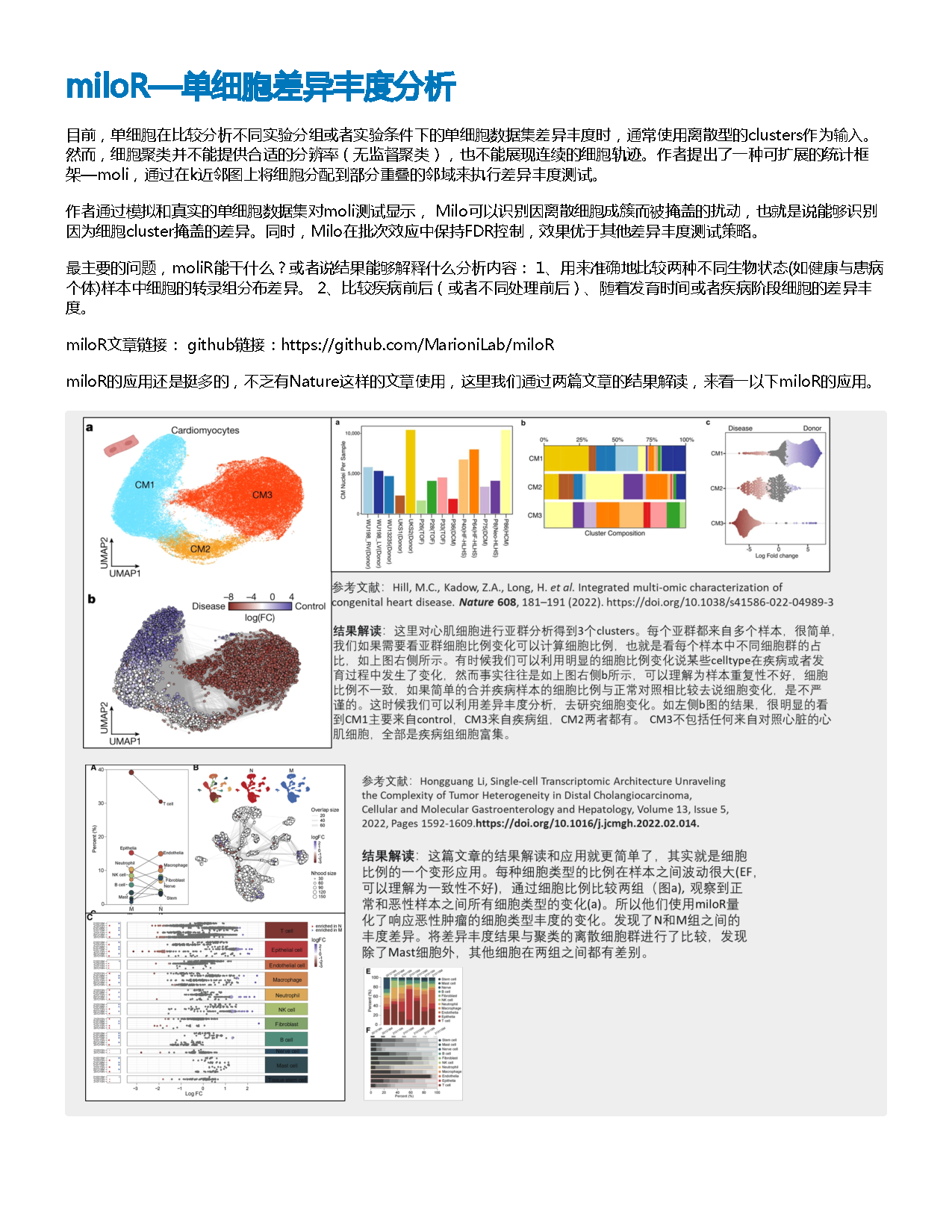
miloR单细胞差异丰度分析KS代码教程/2023-6-30 miloR单细胞差异丰度分析(VIP)/miloR单细胞差异丰度分析.pdf
图源:miloR单细胞差异丰度分析.pdf
分析代码
4 个源码文件,按目录顺序;本机绝对路径已替换为 ~。 代码可复制,但需要按自己的数据改路径与参数。
01_roe组织分布倾向分析.r
# =============================================================
# Ro/e: 单细胞亚群在组织/空间位置中的分布倾向
# 来源整理:https://mp.weixin.qq.com/s/AVQJEYiF7TApDnRzyYXFWA
# 原理:Ro/e = 观测细胞数 / 按总体比例推导的期望细胞数。
# 用途:Ro/e > 1 表示该细胞亚群在该位置富集,Ro/e < 1 表示相对耗竭。
# =============================================================

# ---- 0. 修改为自己的输入与元数据列名 ----
seurat_rds <- "path/to/your_seurat_object.rds"
sample_col <- "orig.ident"   # 样本 ID;建议为生物学重复,而非单个细胞条形码
celltype_col <- "celltype"   # 细胞亚群注释
tissue_col <- "location"     # 组织、解剖位置或空间区域
output_prefix <- "roe_tissue_distribution"

# ---- 1. 加载依赖 ----
required_packages <- c("Seurat", "Startrac", "ComplexHeatmap", "circlize")
missing_packages <- required_packages[!vapply(required_packages, requireNamespace,
                                              logical(1), quietly = TRUE)]
if (length(missing_packages) > 0) {
  stop("请先安装缺失 R 包:", paste(missing_packages, collapse = ", "))
}

library(Seurat)
library(Startrac)
library(ComplexHeatmap)
library(circlize)

# ---- 2. 读取对象并构建 STARTRAC 输入 ----
scRNA <- readRDS(seurat_rds)
meta <- scRNA[[]]

required_columns <- c(sample_col, celltype_col, tissue_col)
if (!all(required_columns %in% colnames(meta))) {
  stop("Seurat metadata 缺少列:",
       paste(setdiff(required_columns, colnames(meta)), collapse = ", "))
}

roe_input <- data.frame(
  clone.id = rownames(meta),
  patient = as.character(meta[[sample_col]]),
  majorCluster = as.character(meta[[celltype_col]]),
  loc = as.character(meta[[tissue_col]]),
  stringsAsFactors = FALSE
)
roe_input <- roe_input[complete.cases(roe_input), , drop = FALSE]

if (nrow(roe_input) == 0) {
  stop("去除缺失值后没有可用细胞。")
}

message("各细胞亚群细胞数:")
print(sort(table(roe_input$majorCluster), decreasing = TRUE))
message("各位置细胞数:")
print(sort(table(roe_input$loc), decreasing = TRUE))

# ---- 3. 计算 Ro/e ----
# method 可选 "chisq"、"fisher"、"freq"。默认使用教程中的 "chisq"。
roe <- calTissueDist(
  roe_input,
  byPatient = FALSE,
  colname.cluster = "majorCluster",
  colname.patient = "patient",
  colname.tissue = "loc",
  method = "chisq",
  min.rowSum = 0
)

write.csv(roe, paste0(output_prefix, "_matrix.csv"), quote = FALSE)
print(roe)

# ---- 4. 热图可视化 ----
value_range <- range(roe, na.rm = TRUE)
if (diff(value_range) == 0) {
  value_range <- value_range + c(-0.1, 0.1)
}

col_fun <- colorRamp2(
  c(value_range[1], 1, value_range[2]),
  c("#2B6CB0", "#F7F7F7", "#C53030")
)

pdf(paste0(output_prefix, "_heatmap.pdf"), width = 8, height = 6)
Heatmap(
  as.matrix(roe),
  name = "Ro/e",
  col = col_fun,
  cluster_rows = TRUE,
  cluster_columns = TRUE,
  row_names_side = "right",
  heatmap_legend_param = list(title = "Ro/e Index"),
  cell_fun = function(j, i, x, y, width, height, fill) {
    grid::grid.text(sprintf("%.2f", roe[i, j]), x, y,
                    gp = grid::gpar(fontsize = 8, col = "black"))
  }
)
dev.off()

# ---- 5. Ro/e 符号化热图(把数字换成 +++/++/+/+−/−)----
# 张泽民团队论文里常见做法:把连续的 Ro/e 数值离散成符号,一眼看出富集/耗竭方向,
# 比逐格读两位小数更适合放进正文图。
# 阈值可以人为调整。本脚本默认(对应公众号原文教程):
#   Ro/e >  2         -> "+++"   强富集
#   Ro/e >  1 & <= 2  -> "++"    富集
#   Ro/e >= 0.5 & <= 1-> "+"     接近期望
#   Ro/e >  0 & < 0.5 -> "+/-"   相对耗竭
#   Ro/e == 0         -> "-"     未检出
# 注意:KS 那份《组织偏好性Roe指数计算方法统一测试》教程用的是另一套阈值
#   (>3 = +++,>1 = ++,>0.8 = +,>0 = +/−,=0 = −),只是刻度不同,结论方向一致。
roe_cuts <- c(`+++` = 2, `++` = 1, `+` = 0.5, `+/-` = 0)

roe_to_symbol <- function(x, cuts = roe_cuts) {
  # 逐条用 !is.na() 保护:NA 不参与赋值,否则会报
  # "NAs are not allowed in subscripted assignments"
  sym <- rep(NA_character_, length(x))
  sym[!is.na(x) & x >  cuts[["+++"]]]                        <- "+++"
  sym[!is.na(x) & x >  cuts[["++"]]  & x <= cuts[["+++"]]]   <- "++"
  sym[!is.na(x) & x >= cuts[["+"]]   & x <= cuts[["++"]]]    <- "+"
  sym[!is.na(x) & x >  cuts[["+/-"]] & x <  cuts[["+"]]]     <- "+/-"
  sym[!is.na(x) & x == cuts[["+/-"]]]                        <- "-"
  sym
}

roe_mat <- as.matrix(roe)
symbol_mat <- matrix(
  roe_to_symbol(as.vector(roe_mat)),
  nrow = nrow(roe_mat), ncol = ncol(roe_mat),
  dimnames = dimnames(roe_mat)
)

write.csv(symbol_mat, paste0(output_prefix, "_symbol_matrix.csv"),
          quote = FALSE, na = "")

# 5a. ComplexHeatmap 版:颜色仍按数值走(蓝→白→蓝深,与原文一致的连续色阶),
#     格子里叠符号。聚类后符号矩阵由 cell_fun 按重排后的下标自动对齐,无需手工处理。
sym_value_range <- range(roe_mat, na.rm = TRUE)
sym_col_fun <- colorRamp2(
  c(0, 0.5, 1, 2, max(c(2.001, sym_value_range[2]))),
  c("#F1F1F1", "#C6DBEF", "#9ECAE1", "#6BAED6", "#2171B5")
)

pdf(paste0(output_prefix, "_heatmap_symbols.pdf"), width = 8, height = 6)
Heatmap(
  roe_mat,
  name = "Ro/e",
  col = sym_col_fun,
  border = TRUE,
  cluster_rows = TRUE,
  cluster_columns = TRUE,
  row_names_side = "right",
  heatmap_legend_param = list(
    title = "Ro/e",
    # 图例刻度直接标符号,读者不用回头查阈值
    at = c(0.25, 0.75, 1.5, 2.5),
    labels = c("+/-", "+", "++", "+++")
  ),
  cell_fun = function(j, i, x, y, width, height, fill) {
    lab <- symbol_mat[i, j]
    if (!is.na(lab)) {
      grid::grid.text(lab, x, y, gp = grid::gpar(fontsize = 8, col = "black"))
    }
  }
)
dev.off()

# 5b. pheatmap 版(还原公众号原文写法)。原文有两个坑,这里已修:
#     坑 1:breaks 有 5 个值却给了 5 个颜色,pheatmap 要求 length(breaks) = length(color) + 1,
#           直接跑会报错。本脚本改成 4 个颜色对应 4 个区间。
#     坑 2:原文把 breaks 写成 seq(0, max(Roe), length.out = 101),等于把颜色按数值线性铺开,
#           前面辛苦设的 0.5/1/2 分级断点根本没生效。要真按符号分级上色,breaks 必须是
#           c(0, 0.5, 1, 2, 上界) 这样的离散断点。
library(pheatmap)

sym_upper <- max(c(2.001, sym_value_range[2]))
sym_breaks <- c(0, 0.5, 1, 2, sym_upper)
sym_bin_colors <- c("#F1F1F1", "#C6DBEF", "#9ECAE1", "#6BAED6")  # 0–0.5 / 0.5–1 / 1–2 / >2

pdf(paste0(output_prefix, "_heatmap_symbols_pheatmap.pdf"), width = 8, height = 6)
pheatmap(
  roe_mat,
  scale = "none",
  display_numbers = symbol_mat,   # 用符号矩阵覆盖显示
  number_color = "black",
  fontsize_number = 10,
  color = sym_bin_colors,
  breaks = sym_breaks,
  cluster_rows = TRUE,
  cluster_cols = TRUE,
  border_color = "grey85",
  fontsize = 10,
  cellwidth = 30,
  cellheight = 25
)
dev.off()

# 解释注意事项:
# 1. Ro/e 是相对组成指标,不能替代基于样本重复的统计检验。
# 2. 对细胞数极少的亚群,Ro/e 容易不稳定;先检查上方的 cell count。
# 3. 若每位受试者都包含多个组织位置,可进一步评估 byPatient = TRUE 的结果。
# 4. 符号化的阈值(2/1/0.5)是习惯用法而非统计界值,换一套阈值结论方向不变、强弱会变;
#    报图时应说明自己用的阈值,或直接给出数值矩阵 CSV 供读者核对。
# 5. Ro/e 的期望值来自该组细胞总数占比。当某细胞类型总数为 0 或某组细胞数为 0 时,
#    期望值可能为 0,此时 Ro/e 会变成 NaN/Inf,符号矩阵相应位置为 NA(显示为空格)。
02_augur扰动响应优先级分析.r
# =============================================================
# Augur: 按转录组可分离性识别最受扰动影响的细胞类型
# 来源整理:https://mp.weixin.qq.com/s/AVQJEYiF7TApDnRzyYXFWA
# AUC 越高,表示该细胞类型的基因表达越能区分两种条件。
# =============================================================

# ---- 0. 修改为自己的输入与元数据列名 ----
seurat_rds <- "path/to/your_seurat_object.rds"
celltype_col <- "celltype"  # 细胞亚群注释
condition_col <- "condition" # 扰动/疾病/治疗等二分类或多分类标签
output_prefix <- "augur_condition_priority"
n_threads <- 8

# ---- 1. 加载依赖 ----
required_packages <- c("Seurat", "Augur", "ggplot2")
missing_packages <- required_packages[!vapply(required_packages, requireNamespace,
                                              logical(1), quietly = TRUE)]
if (length(missing_packages) > 0) {
  stop("请先安装缺失 R 包:", paste(missing_packages, collapse = ", "))
}

library(Seurat)
library(Augur)
library(ggplot2)

# ---- 2. 读取对象并检查输入 ----
scRNA <- readRDS(seurat_rds)
meta <- scRNA[[]]
required_columns <- c(celltype_col, condition_col)
if (!all(required_columns %in% colnames(meta))) {
  stop("Seurat metadata 缺少列:",
       paste(setdiff(required_columns, colnames(meta)), collapse = ", "))
}

meta_for_check <- meta[, required_columns, drop = FALSE]
meta_for_check <- meta_for_check[complete.cases(meta_for_check), , drop = FALSE]
if (length(unique(meta_for_check[[condition_col]])) < 2) {
  stop("condition_col 至少需要两个非缺失条件。")
}

message("每个细胞类型在各条件下的细胞数:")
print(table(meta_for_check[[celltype_col]], meta_for_check[[condition_col]]))

# ---- 3. 计算细胞类型优先级 ----
augur_result <- calculate_auc(
  scRNA,
  cell_type_col = celltype_col,
  label_col = condition_col,
  n_threads = n_threads
)

saveRDS(augur_result, paste0(output_prefix, "_result.rds"))
write.csv(augur_result$AUC, paste0(output_prefix, "_auc.csv"),
          row.names = FALSE, quote = FALSE)
print(augur_result$AUC)

# ---- 4. 可视化 ----
p_lollipop <- plot_lollipop(augur_result) +
  ggtitle("Augur cell-type prioritization")
ggsave(paste0(output_prefix, "_lollipop.pdf"), p_lollipop,
       width = 8, height = 6)

# rank 模式按 AUC 显示优先级;default 模式展示默认可视化。
if ("umap" %in% names(scRNA@reductions)) {
  p_umap_rank <- plot_umap(
    augur_result, scRNA,
    mode = "rank",
    reduction = "umap",
    palette = "cividis",
    cell_type_col = celltype_col
  )
  ggsave(paste0(output_prefix, "_umap_rank.pdf"), p_umap_rank,
         width = 8, height = 6)
}

# 解释注意事项:
# 1. AUC 衡量的是条件间转录组可分离性,不等同于该细胞类型数量发生变化。
# 2. 同一受试者内的细胞不是独立生物学重复;结果应与样本层面的设计和验证结合解释。
# 3. 极少细胞的亚群或条件极不平衡时,优先级可能不稳定,应先审查上方列联表。
03_milor差异丰度分析.r
# =============================================================
# miloR: 基于 KNN 邻域的单细胞差异丰度 (DA) 分析
# 来源整理:https://mp.weixin.qq.com/s/AVQJEYiF7TApDnRzyYXFWA
# 设计重点:以生物学样本为统计单位,而不是把单细胞当作独立重复。
# =============================================================

# ---- 0. 修改为自己的输入、元数据列与图参数 ----
seurat_rds <- "path/to/your_seurat_object.rds"
sample_col <- "orig.ident"   # 生物学样本 ID
condition_col <- "condition" # 需要比较的实验条件
celltype_col <- "celltype"   # 用于给显著邻域注释
reference_level <- "control" # logFC 的参考水平;替换为实际条件名
output_prefix <- "miloR_differential_abundance"

# 必须与 Seurat 构建邻居图时的 PCA 设置协调,并据数据规模调整。
k_neighbors <- 30
n_pcs <- 30
nhood_prop <- 0.1
fdr_cutoff <- 0.10

# ---- 1. 加载依赖 ----
required_packages <- c(
  "Seurat", "miloR", "SingleCellExperiment", "SummarizedExperiment",
  "scater", "scran", "ggplot2", "patchwork"
)
missing_packages <- required_packages[!vapply(required_packages, requireNamespace,
                                              logical(1), quietly = TRUE)]
if (length(missing_packages) > 0) {
  stop("请先安装缺失 R 包:", paste(missing_packages, collapse = ", "))
}

library(Seurat)
library(miloR)
library(SingleCellExperiment)
library(SummarizedExperiment)
library(scater)
library(scran)
library(ggplot2)
library(patchwork)

# ---- 2. 读取对象与设计检查 ----
scRNA <- readRDS(seurat_rds)
meta <- scRNA[[]]
required_columns <- c(sample_col, condition_col, celltype_col)
if (!all(required_columns %in% colnames(meta))) {
  stop("Seurat metadata 缺少列:",
       paste(setdiff(required_columns, colnames(meta)), collapse = ", "))
}
if (!("pca" %in% names(scRNA@reductions))) {
  stop("Seurat 对象需要 PCA 降维结果(reduction = 'pca')。")
}
if (!("umap" %in% names(scRNA@reductions))) {
  stop("Seurat 对象需要 UMAP 降维结果(reduction = 'umap')用于可视化。")
}

sample_design_check <- unique(meta[, c(sample_col, condition_col), drop = FALSE])
sample_condition_counts <- table(sample_design_check[[sample_col]])
if (any(sample_condition_counts > 1)) {
  stop("同一个样本 ID 对应了多个条件,请检查 sample_col 与 condition_col。")
}
if (length(unique(sample_design_check[[condition_col]])) < 2) {
  stop("condition_col 至少需要两个条件。")
}
if (!(reference_level %in% unique(as.character(sample_design_check[[condition_col]])))) {
  stop("reference_level 不在 condition_col 中:", reference_level)
}

message("每个样本的细胞数:")
print(table(meta[[sample_col]]))
message("每个条件的生物学样本数:")
print(table(sample_design_check[[condition_col]]))

# ---- 3. Seurat 转 Milo,并构建 KNN 邻域 ----
sce <- as.SingleCellExperiment(scRNA)
milo <- Milo(sce)
reducedDim(milo, "PCA") <- Embeddings(scRNA, reduction = "pca")
reducedDim(milo, "UMAP") <- Embeddings(scRNA, reduction = "umap")

milo <- buildGraph(milo, k = k_neighbors, d = n_pcs, reduced.dim = "PCA")
milo <- makeNhoods(
  milo,
  prop = nhood_prop,
  k = k_neighbors,
  d = n_pcs,
  refined = TRUE,
  reduced_dims = "PCA"
)

pdf(paste0(output_prefix, "_neighborhood_size.pdf"), width = 7, height = 5)
plotNhoodSizeHist(milo)
dev.off()

# ---- 4. 以样本为单位计数,并建立设计矩阵 ----
milo <- countCells(
  milo,
  meta.data = as.data.frame(colData(milo)),
  sample = sample_col
)

design_df <- unique(as.data.frame(colData(milo))[, c(sample_col, condition_col), drop = FALSE])
rownames(design_df) <- design_df[[sample_col]]
design_df <- design_df[colnames(nhoodCounts(milo)), , drop = FALSE]
if (anyNA(design_df[[condition_col]])) {
  stop("无法把设计表与 nhoodCounts 的样本列匹配,请检查 sample_col。")
}
design_df[[condition_col]] <- stats::relevel(
  factor(design_df[[condition_col]]), ref = reference_level
)
design_formula <- stats::as.formula(paste("~", condition_col))

# ---- 5. DA 检验、邻域注释与可视化 ----
milo <- calcNhoodDistance(milo, d = n_pcs, reduced.dim = "PCA")
da_results <- testNhoods(milo, design = design_formula, design.df = design_df)
da_results <- annotateNhoods(milo, da_results, coldata_col = celltype_col)
da_results <- da_results[order(da_results$SpatialFDR), , drop = FALSE]

write.csv(da_results, paste0(output_prefix, "_results.csv"), row.names = FALSE, quote = FALSE)
saveRDS(list(milo = milo, design = design_df, da_results = da_results),
        paste0(output_prefix, "_objects.rds"))
print(head(da_results, 20))

p_pvalue <- ggplot(da_results, aes(x = PValue)) +
  geom_histogram(bins = 50, fill = "#4C78A8", color = "white") +
  theme_classic()
p_volcano <- ggplot(da_results, aes(x = logFC, y = -log10(SpatialFDR))) +
  geom_point(aes(color = SpatialFDR < fdr_cutoff), alpha = 0.7) +
  geom_hline(yintercept = -log10(fdr_cutoff), linetype = 2) +
  scale_color_manual(values = c("FALSE" = "#8C8C8C", "TRUE" = "#C53030")) +
  theme_classic()
ggsave(paste0(output_prefix, "_diagnostics.pdf"), p_pvalue + p_volcano,
       width = 11, height = 5)

milo <- buildNhoodGraph(milo)
p_umap <- plotReducedDim(
  milo,
  dimred = "UMAP",
  colour_by = condition_col,
  text_by = celltype_col,
  text_size = 3,
  point_size = 0.4
)
p_nhood <- plotNhoodGraphDA(milo, da_results, layout = "UMAP", alpha = 0.8)
ggsave(paste0(output_prefix, "_umap_and_nhood_graph.pdf"), p_umap + p_nhood,
       width = 12, height = 6)

# ---- 6. 可选:对显著邻域自动分组,并寻找群组 marker ----
da_grouped <- groupNhoods(
  milo,
  da_results,
  max.lfc.delta = 2,
  da.fdr = fdr_cutoff
)
write.csv(da_grouped, paste0(output_prefix, "_grouped_nhoods.csv"),
          row.names = FALSE, quote = FALSE)

# 解释注意事项:
# 1. 不要把没有样本重复的两组数据解释为可靠的 DA 统计检验。
# 2. k_neighbors、n_pcs、nhood_prop 影响邻域尺度;先从默认/推荐范围试跑并检查邻域大小分布。
# 3. SpatialFDR 是 miloR 为重叠邻域校正后的主要显著性指标;不要使用教程示例中的 0.9 阈值。
ks代码教程/2023-6-30 milor单细胞差异丰度分析(vip)/milor单细胞差异丰度分析.r
# 差异表达分析我们都很熟悉,就是看不同组之间、或者实验处理后与对照组相比基因表达的变化。
# 而差异丰度分析是检测不同条件下celltype组成的变化,通过不同组、实验条件、发育阶段、
# 时间阶段比较,发现新的细胞亚群或者细胞比例显著差异的亚群。


setwd('D:/KS项目/公众号文章/miloR单细胞差异丰度')
devtools::install_github("MarioniLab/miloR", ref="devel")
library(miloR)#UMAP降维数据不会出错,TSNE不行,要有重复
library(Seurat)
library(ggplot2)
library(SingleCellExperiment)
remotes::install_github('satijalab/seurat-wrappers')
library(SeuratWrappers)
library(ggbeeswarm)
library(scater)
library(scales)
library(forcats)
library(data.table)
library(stringr)
library(dplyr)

#================================================================================

#                     只有两组(例如normal组和疾病组)

#================================================================================

#加载单细胞数据
load("D:/KS项目/公众号文章/miloR单细胞差异丰度/PMN_sce.RData")
DimPlot(PMN_sce,label = T)
unique(PMN_sce$group)
# [1] "disease" "healthy"
PMN_sce$group<- factor(PMN_sce$group, levels=c("healthy","disease"))#样本分组

#miloR输入对象是SingleCellExperiment,所以我们是常用的seurat对象的话,转化一下
PMN_sce <- as.SingleCellExperiment(PMN_sce)
PMN_sce_milo <- miloR::Milo(PMN_sce)#milo object构建
PMN_sce_milo <- miloR::buildGraph(PMN_sce_milo, k = 30, d = 50)#构建k-nearest neighbour graph
#k是构建graph是需要考虑的邻近的数量,这个参数可自行调整
#定义具有代表性的邻域
PMN_sce_milo <- makeNhoods(PMN_sce_milo,
                           prop = 0.2, #随机抽取洗吧比例,一般情况0.1-0.2足够
                           k = 30, #建议使用与buildGraph一样的k值
                           d=50, #KNN降维数,建议使用与buildGraph一样的d值
                           refined = TRUE)


PMN_sce_milo <- countCells(PMN_sce_milo, meta.data = data.frame(colData(PMN_sce_milo)),
                        sample="orig.ident")#sample是样本重复
#分组,类似于做差异分析的时候构建的design
traj_design <- data.frame(colData(PMN_sce_milo))[,c("orig.ident", "group")]#分别是重复样本ID和分组
traj_design$orig.ident <- as.factor(traj_design$orig.ident)
traj_design <- distinct(traj_design)
rownames(traj_design) <- traj_design$orig.ident
#计算cell距离
PMN_sce_milo <- calcNhoodDistance(PMN_sce_milo, d=50)
#差异分析结果、实验分组两者之前差异
da_results <- testNhoods(PMN_sce_milo,
                         design = ~ group,
                         design.df = traj_design)#分组
PMN_sce_milo <- buildNhoodGraph(PMN_sce_milo)#构建graph for 可视化


#可视化,这些可视化函数都可以与ggplot2互通,所以图片修饰上可以按照ggplot2的方式

#可视化1----------------------------------------------------------------------------
#UMAP图
plotUMAP(PMN_sce_milo, colour_by = "celltype")
#UMAP图展示neighborhoods
pdf('milo_PMN.pdf', width=8, height=8)
plotNhoodGraphDA(PMN_sce_milo, da_results, alpha=0.1) +
  scale_fill_gradient2(low="#070091",#修改颜色
                       mid="lightgrey",
                       high="#910000",
                       name="log2FC",
                       limits=c(-5,5),
                       oob=squish)


#可视化2----------------------------------------------------------------------------
#蜂群图展示celltype logFC变化
da_results <- annotateNhoods(PMN_sce_milo, da_results, coldata_col = "celltype")
plotDAbeeswarm(da_results, group.by = "celltype") +
  scale_color_gradient2(low="#070091",
                        mid="lightgrey",
                        high="#910000",
                        limits=c(-5,5),
                        oob=squish) +
  labs(x="", y="Log2 Fold Change") +
  theme_bw(base_size=10)+
  theme(axis.text = element_text(colour = 'black'))